


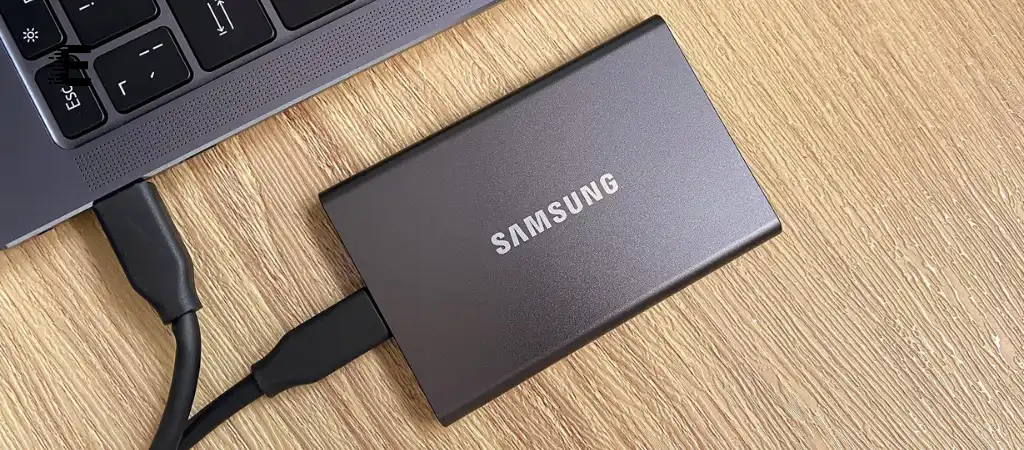
When it comes to video editing, having the right storage device is crucial for maintaining smooth performance and efficient workflow. With the advent of high-resolution videos and resource-intensive editing software, the need for fast, reliable, and high-capacity storage solutions has never been greater.
One such device that has caught the attention of many in the video editing community is the Samsung T7 portable SSD. Is The Samsung T7 Good For Video Editing?
But the question remains: Is the Samsung T7 the best external SSD drive for video editing? In this comprehensive guide, we’ll explore the Samsung T7’s capabilities, its pros and cons, and whether it’s the right choice for video editors.

Importance of Storage in Video Editing
Before delving into the specifics of the Samsung T7, it’s essential to understand why storage is so critical in video editing.
The storage device you use can significantly impact your editing process in several ways:
Speed
- Video editing requires reading and writing large files quickly. The faster your storage, the quicker you can access and edit your footage. This directly affects the efficiency of your workflow.
Capacity
- High-definition (HD), 4K, and even 8K video files are massive. You need ample storage space to keep all your project files, source footage, and final renders.
Reliability
- Unreliable storage can lead to data corruption or loss, which can be devastating, especially in professional video editing.
Portability
- For editors who work on the go, a portable storage device is a must. It should be lightweight, durable, and easy to carry.
Now, let’s examine how the Samsung T7 performs in these critical areas.
Samsung T7 Overview
The Samsung T7 is a portable SSD known for its sleek design, high-speed performance, and robust build quality. It is available in several capacities, including 500GB, 1TB, and 2TB, and uses the USB 3.2 Gen 2 interface, which allows for fast data transfer speeds.
Key Specifications of Samsung T7
- Interface: USB 3.2 Gen 2 (10Gbps)
- Read Speed: Up to 1,050 MB/s
- Write Speed: Up to 1,000 MB/s
- Encryption: AES 256-bit hardware encryption
- Durability: Shock-resistant (can withstand drops from up to 2 meters)
- Dimensions: 85mm x 57mm x 8.0mm
- Weight: 58 grams
Samsung T7 Features
- Slim and Compact Design: The T7 is designed to be easily portable, making it ideal for video editors who need to work in different locations.
- High-Speed Performance: With its impressive read and write speeds, the T7 promises to handle large files and complex editing tasks with ease.
- Data Security: The built-in AES 256-bit encryption ensures that your data is protected from unauthorized access.
- Cross-Platform Compatibility: The T7 is compatible with a wide range of devices, including Windows PCs, Mac computers, and Android devices.
Performance of Samsung T7 in Video Editing
Now that we have an overview of what the Samsung T7 offers, let’s dive into how it performs in real-world video editing scenarios.
Speed and Efficiency
One of the most critical factors in determining whether the Samsung T7 is good for video editing is its speed. Video editing software, such as Adobe Premiere Pro, Final Cut Pro, and DaVinci Resolve, requires rapid access to source files. The T7’s read speed of up to 1,050 MB/s and write speed of up to 1,000 MB/s are impressive and make it suitable for handling large video files, including 4K and 8K footage.
For example, when working with large 4K video files, the T7 allows for quick file transfers, reducing wait times during the import/export process. This can significantly streamline your workflow, allowing you to focus more on editing and less on waiting for files to load or save.
Smooth Playback and Rendering
The speed of the Samsung T7 also ensures smooth playback of video files directly from the drive. When editing, especially with high-resolution footage, lag-free playback is essential. The T7’s high read speed ensures that you can preview your edits in real time without stuttering or delays, even when dealing with multiple layers of video and effects.
Furthermore, the fast write speed of the T7 aids in rendering times. Whether you’re exporting a final video or rendering a preview, the T7’s performance helps minimize the time required for these tasks, making your editing process more efficient.
Capacity Considerations
The Samsung T7 comes in capacities of up to 2TB, which is sufficient for most video editing projects. For reference, a 1TB drive can store approximately 250 hours of HD video or 12 hours of 4K video. However, if you frequently work with large amounts of 4K or 8K footage, you may find that even 2TB fills up quickly.
In such cases, using the T7 as a working drive while archiving older projects on a larger, slower storage solution (such as an HDD) could be a practical approach. This way, you can maximize the T7’s speed benefits without running out of space.
Portability and Build Quality
For video editors who work on the move, the portability of the Samsung T7 is a significant advantage. Weighing just 58 grams and featuring a slim profile, the T7 is easy to carry in a laptop bag or even a pocket. Despite its lightweight design, the T7 is also durable, with a shock-resistant casing that can withstand drops from up to 2 meters.
This makes the T7 not only convenient but also reliable for on-the-go editing, whether you’re traveling between locations, working on set, or collaborating in different environments.
Data Security
When working on professional video projects, data security is paramount. The Samsung T7’s AES 256-bit hardware encryption provides robust protection against unauthorized access. This feature is particularly useful if you’re working with sensitive or proprietary footage that needs to be kept secure.
The drive also comes with Samsung’s software, which allows you to set a password and manage your encryption settings. While this adds a layer of protection, it does not compromise the drive’s performance, ensuring that you can edit securely without experiencing any slowdown.
Pros and Cons of Using the Samsung T7 for Video Editing
Pros
-
High-Speed Performance
The Samsung T7 offers excellent read/write speeds, making it ideal for handling large video files and reducing wait times during editing.
-
Portable Design
Its lightweight and compact form factor makes it easy to carry, perfect for editors who need to work in various locations.
-
Durability
The shock-resistant design ensures that the drive can withstand minor physical impacts, making it reliable for on-the-go use.
-
Cross-Platform Compatibility
Works seamlessly with both Windows and Mac systems, as well as Android devices.
-
Strong Data Security
AES 256-bit hardware encryption ensures your data remains secure.
Cons
-
Limited Capacity for Large Projects
While 2TB is sufficient for many projects, it may not be enough for editors who work with extensive 4K or 8K footage.
-
No Thunderbolt Support
The Samsung T7 uses USB 3.2 Gen 2, which is fast but not as fast as Thunderbolt 3 or 4 interfaces. Editors seeking the absolute highest speeds may find this a limitation.
-
Price
The T7 is more expensive than traditional HDDs or slower SSDs, which might be a consideration for those on a tight budget.
Comparing the Samsung T7 to Other Storage Solutions
To determine if the Samsung T7 is good for video editing, it’s helpful to compare it with other storage solutions available on the market.
Samsung T7 vs. External HDDs
External hard disk drives (HDDs) are commonly used for video editing due to their large storage capacities and lower cost. However, they fall short in speed compared to SSDs. An HDD typically offers read/write speeds of around 100-150 MB/s, which can lead to slow file transfers and longer rendering times. While HDDs are a more cost-effective option, the Samsung T7’s significantly faster speeds make it a better choice for editors who prioritize efficiency.
Samsung T7 vs. Other Portable SSDs
Other portable SSDs, such as the SanDisk Extreme Pro or the WD My Passport SSD, offer similar speeds and capacities as the Samsung T7. However, the T7 stands out with its combination of speed, security features, and portability. Its AES 256-bit encryption, for example, is a more robust security feature compared to some competitors.
Samsung T7 vs. Thunderbolt SSDs
Thunderbolt SSDs, such as the Samsung X5, offer even faster data transfer speeds than the T7, reaching up to 2,800 MB/s. However, these drives are significantly more expensive and require a device with Thunderbolt 3 or 4 ports to achieve these speeds. For editors who need the fastest possible performance and are willing to invest in it, a Thunderbolt SSD might be worth considering. However, for most users, the T7’s speed is more than adequate for video editing tasks.
Is the Samsung T7 Good for Video Editing? A Detailed Conclusion
After examining the Samsung T7’s performance, features, and comparison to other storage solutions, it’s clear that the Samsung T7 is indeed a good option for video editing. Its high-speed performance, portability, and security features make it a strong contender for video editors who need a reliable and efficient storage solution.
Key Takeaways
-
Speed
The T7 offers excellent read and write speeds, which are crucial for handling large video files, ensuring smooth playback, and reducing rendering times.
-
Portability
Its compact and lightweight design makes it ideal for editors who need to work in various locations.
-
Durability and Security
The T7’s robust build and strong encryption make it a reliable and secure choice for professional video editing.
You Might Be Interested In
- How Do I Compare Graphics Cards?
- What Does a Graphics Card Do In a Computer?
- What Is Basic Hardware and Networking?
- What Is a Sandisk Extreme Portable SSD Used For?
- What Are The Five Functions Of The Motherboard?
Conclusion
For video editors looking for a portable, fast, and secure SSD, the Samsung T7 is an excellent choice. It offers a great balance of performance, portability, and security, making it suitable for most video editing tasks, including working with HD, 4K, and even 8K footage. While it may not be the best choice for those who need the absolute highest speeds or the largest capacities, it is certainly a strong option for a wide range of editing scenarios.
FAQs about Is The Samsung T7 Good For Video Editing?
What makes the Samsung T7 suitable for video editing?
The Samsung T7 is suitable for video editing primarily due to its high-speed performance, which allows for rapid read and write speeds of up to 1,050 MB/s and 1,000 MB/s, respectively. This speed is crucial for handling large video files, enabling smooth playback during editing, and minimizing rendering times.
Additionally, its compact and portable design makes it easy for video editors to carry it while working on location. The drive’s durability ensures it can withstand physical impacts, and the built-in AES 256-bit encryption provides robust data security, making it a well-rounded option for professionals in the video editing field.
How does the Samsung T7 compare to traditional external HDDs for video editing?
When comparing the Samsung T7 to traditional external HDDs, the T7 offers significantly faster read and write speeds, which can range from 100-150 MB/s for most HDDs. This speed difference is critical for video editing, as it affects file transfer times, playback smoothness, and rendering efficiency.
While HDDs are generally more cost-effective and provide larger storage capacities, they may lead to bottlenecks in workflows involving high-resolution video files. The T7’s compact size and durability also make it a better choice for on-the-go editors. Overall, while HDDs may be suitable for storage, the Samsung T7 excels in performance, making it a better option for active editing.
What capacity options does the Samsung T7 offer, and is it enough for video editing?
The Samsung T7 is available in three capacity options: 500GB, 1TB, and 2TB. For many video editing projects, particularly those involving HD or even 4K footage, these capacities are generally sufficient. A 1TB drive can store approximately 250 hours of HD video or around 12 hours of 4K video, which is adequate for many users.
However, for those who frequently work with extensive 4K or 8K footage, even 2TB may fill up quickly. In such cases, it may be advisable to use the T7 as a working drive for current projects while archiving older projects on larger, slower storage devices, such as HDDs.
Can the Samsung T7 be used with both Windows and Mac systems?
Yes, the Samsung T7 is designed to be cross-platform compatible, making it usable with both Windows and Mac systems, as well as Android devices. It utilizes a USB 3.2 Gen 2 interface, which ensures high-speed data transfer across different operating systems.
Users may need to format the drive to suit their specific OS (exFAT is recommended for compatibility across platforms), but once formatted, the T7 works seamlessly with various devices, making it an excellent choice for video editors who may use different systems in their workflows.
Does the Samsung T7 offer data security features, and why are they important for video editing?
Yes, the Samsung T7 includes built-in data security features, notably AES 256-bit hardware encryption. This encryption is important for video editors, especially those handling sensitive or proprietary footage, as it protects data from unauthorized access.
By enabling password protection on the drive, users can ensure that their work remains secure, reducing the risk of data loss or theft. Given the professional nature of video editing, where confidentiality can be paramount, the Samsung T7’s robust security features add an essential layer of protection for users and their projects.
