



Solid State Drives (SSDs) have revolutionized the way we store and access data, and the SanDisk Extreme Portable SSD is one of the leading options on the market. This powerful, compact device offers incredible speed, durability, and flexibility, making it a popular choice among professionals, creatives, and everyday users alike. What Is A Sandisk Extreme Portable SSD Used For?
In this comprehensive guide, we’ll explore the various uses of the Best External SSD Drive, the SanDisk Extreme Portable SSD, highlighting its advantages and practical applications.
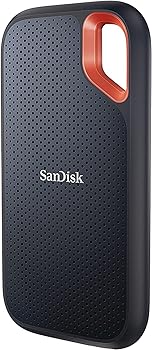
SanDisk Extreme Portable SSD
The SanDisk Extreme Portable SSD is a high-performance storage solution designed to meet the demands of users who need fast, reliable, and durable data storage. Whether you’re a professional content creator, a gamer, or someone who needs to store large amounts of data, this SSD offers a range of features that make it a versatile tool for various applications.
Key Features of SanDisk Extreme Portable SSD
Speed and Performance
One of the most significant advantages of the SanDisk Extreme Portable SSD is its speed. With read speeds of up to 1050MB/s and write speeds of up to 1000MB/s, this SSD is designed to handle even the most data-intensive tasks with ease. Whether you’re transferring large files, editing high-resolution videos, or running complex software, the SanDisk Extreme Portable SSD delivers the performance you need.
Durability and Portability
Another standout feature of the SanDisk Extreme Portable SSD is its rugged design. The drive is built to withstand tough conditions, with an IP55 rating for water and dust resistance. It’s also shock-resistant, capable of withstanding drops from up to 2 meters. Despite its durability, the SSD is incredibly compact and lightweight, making it easy to carry around wherever you go.
Capacity Options
The SanDisk Extreme Portable SSD comes in a variety of storage capacities, ranging from 250GB to 4TB. This allows users to choose the size that best suits their needs, whether they’re looking to store a small collection of files or a vast library of media.
Primary Uses of SanDisk Extreme Portable SSD
Storage and Backup
One of the most common uses of the SanDisk Extreme Portable SSD is for storage and backup purposes. The SSD’s high capacity and fast transfer speeds make it ideal for storing large amounts of data, such as photos, videos, documents, and more. Additionally, the drive’s durability ensures that your data is protected even in harsh conditions, making it a reliable option for long-term storage and backup.
Media Editing and Production
For creative professionals, the SanDisk Extreme Portable SSD is a valuable tool for media editing and production. The drive’s high-speed performance allows for smooth playback and editing of high-resolution videos and large image files, making it a favorite among photographers, videographers, and graphic designers. Whether you’re working in the studio or on location, the SSD’s portability ensures that you can take your projects with you wherever you go.
Gaming
Gamers can also benefit from the SanDisk Extreme Portable SSD. The drive’s fast read and write speeds reduce load times and improve overall performance, making it an excellent choice for storing games and game data. Additionally, the SSD’s compact size and durability make it easy to transport, allowing gamers to take their favorite games with them on the go.
Professional Photography and Videography
The SanDisk Extreme Portable SSD is particularly popular among professional photographers and videographers. The drive’s high capacity allows for the storage of large RAW image files and 4K video footage, while its fast transfer speeds enable quick access and editing of these files. The SSD’s rugged design also ensures that it can withstand the rigors of on-location shoots, making it a reliable choice for professionals who need to store and manage large amounts of data.
Data Transfer and Portability
Another key use of the SanDisk Extreme Portable SSD is for data transfer and portability. The drive’s high-speed performance makes it ideal for transferring large files between devices, while its compact size and lightweight design make it easy to carry around. Whether you’re moving files between a computer and a mobile device, or sharing data with colleagues and clients, the SanDisk Extreme Portable SSD offers a fast and convenient solution.
Secondary Uses of SanDisk Extreme Portable SSD
Running Virtual Machines
The SanDisk Extreme Portable SSD is also a great option for running virtual machines (VMs). The drive’s fast read and write speeds ensure that VMs run smoothly, while its high capacity allows for the storage of multiple virtual environments. This makes the SSD a valuable tool for developers, IT professionals, and anyone who needs to run virtual machines for testing or development purposes.
Expanding Console Storage
For console gamers, the SanDisk Extreme Portable SSD can be used to expand storage capacity. Many gaming consoles, such as the PlayStation and Xbox, support external storage devices, and the SanDisk Extreme Portable SSD’s fast performance and large capacity make it an excellent choice for storing games and game data. This allows gamers to expand their library without sacrificing performance.
Secure Data Storage
Data security is a concern for many users, and the SanDisk Extreme Portable SSD offers several features that help protect your data. The drive includes built-in hardware encryption, which ensures that your data is secure even if the drive is lost or stolen. Additionally, the SSD’s rugged design and IP55 rating provide protection against physical damage, further enhancing its suitability for secure data storage.
How to Maximize the Use of SanDisk Extreme Portable SSD
Proper Formatting and Setup
To get the most out of your SanDisk Extreme Portable SSD, it’s important to ensure that the drive is properly formatted and set up for your specific needs. The SSD can be formatted to work with various operating systems, including Windows, macOS, and Linux. Additionally, you may want to partition the drive to separate different types of data, or to create a dedicated space for running virtual machines or other specific tasks.
Optimizing for Speed and Efficiency
While the SanDisk Extreme Portable SSD is already designed for high performance, there are several steps you can take to optimize its speed and efficiency. For example, you can enable TRIM support, which helps maintain the SSD’s performance over time by ensuring that deleted data is properly erased. Additionally, you can use the SSD in conjunction with software tools that help manage and optimize your data, such as disk cleanup utilities and backup software.
Data Security Practices
To ensure that your data remains secure, it’s important to follow best practices for data security when using the SanDisk Extreme Portable SSD. This includes enabling hardware encryption, using strong passwords, and regularly backing up your data to another location. Additionally, you should be cautious when sharing the drive with others, and avoid connecting it to untrusted devices or networks.
You Might Be Interested In
- What Is Batch Size In Machine Learning?
- What Is an ALU?
- What Are Features In Machine Learning?
- How To Get Into Machine Learning?
- How Many Processors Are On A GPU?
Conclusion
In conclusion, the SanDisk Extreme Portable SSD is a versatile and powerful tool that can be used for a wide range of applications. Whether you’re a professional photographer, a gamer, or someone who needs a reliable storage solution for large amounts of data, this SSD offers the speed, durability, and flexibility you need.
By understanding the various uses of the SanDisk Extreme Portable SSD and following best practices for setup and data security, you can maximize the benefits of this impressive storage device.
FAQs about What Is a Sandisk Extreme Portable SSD Used For
What are the main advantages of using the SanDisk Extreme Portable SSD for media editing?
The SanDisk Extreme Portable SSD offers several key advantages for media editing, making it a preferred choice for professionals in photography, videography, and graphic design:
- High-Speed Performance: With read speeds of up to 1050MB/s and write speeds up to 1000MB/s, the SSD enables fast access to large media files, allowing for smooth playback and editing of high-resolution videos and large image files. This significantly reduces lag time and enhances productivity.
- Portability: The compact and lightweight design of the SanDisk Extreme Portable SSD makes it easy to carry around, whether you’re working in the studio or on location. Its portability ensures that you have your projects with you at all times, providing flexibility in where and how you work.
- Durability: The SSD is designed to withstand tough conditions, with an IP55 rating for water and dust resistance, as well as shock resistance. This durability ensures that your data is protected even in challenging environments, making it a reliable tool for professionals who work in various settings.
- Large Storage Capacity: The SSD is available in various capacities, from 250GB to 4TB, allowing you to store extensive libraries of RAW image files, 4K video footage, and other large media files. This makes it an ideal storage solution for media professionals who need to manage substantial amounts of data.
How does the SanDisk Extreme Portable SSD improve gaming performance?
The SanDisk Extreme Portable SSD enhances gaming performance in several ways:
- Faster Load Times: The SSD’s high-speed read and write capabilities drastically reduce game load times, allowing for quicker access to game data and smoother gameplay. This is especially beneficial for games with large files or complex environments that require rapid data retrieval.
- Expanded Storage: For gamers who have extensive libraries of games, the SanDisk Extreme Portable SSD offers an excellent solution for expanding storage. With up to 4TB of space, you can store multiple games on the SSD, freeing up internal console storage and maintaining performance.
- Portability: The SSD’s compact size and lightweight design make it easy to carry, allowing gamers to take their favorite games on the go. This is particularly useful for gamers who travel or share their games with friends.
- Durability: The rugged construction of the SSD ensures that it can withstand the rigors of travel, including drops and exposure to water or dust. This durability means that your gaming data remains safe, even in less-than-ideal conditions.
Can I use the SanDisk Extreme Portable SSD to run virtual machines, and what are the benefits?
Yes, the SanDisk Extreme Portable SSD can be used to run virtual machines (VMs), and it offers several benefits for this application:
- High-Speed Data Access: The SSD’s fast read and write speeds enable smooth operation of virtual machines, reducing latency and improving the overall performance of VMs. This is crucial for running complex software, multiple operating systems, or testing environments.
- Large Capacity: With capacities up to 4TB, the SSD can store multiple virtual machines, allowing you to run various environments without worrying about space constraints. This is particularly beneficial for developers, IT professionals, and anyone who needs to manage multiple VMs simultaneously.
- Portability: The SanDisk Extreme Portable SSD’s compact size allows you to carry your virtual machines with you, making it easy to switch between different workstations or locations. This portability is especially useful for professionals who work remotely or need to collaborate with colleagues in different locations.
- Durability: The SSD’s rugged design ensures that your virtual machines are protected from physical damage, such as drops or exposure to harsh conditions. This durability adds an extra layer of security, ensuring that your data remains intact even in challenging environments.
How does the SanDisk Extreme Portable SSD enhance data security, and what steps should I take to maximize it?
The SanDisk Extreme Portable SSD offers several features that enhance data security, along with best practices you can follow to maximize this security:
- Hardware Encryption: The SSD includes built-in 256-bit AES hardware encryption, which protects your data by requiring a password to access the drive. This ensures that even if the SSD is lost or stolen, your data remains secure.
- Rugged Design: The SSD’s shock-resistant, water-resistant, and dust-resistant design protects your data from physical damage. This durability ensures that your data is safe from accidental drops, spills, and other environmental hazards.
- Password Protection: You can enable password protection on the SanDisk Extreme Portable SSD, adding an extra layer of security to prevent unauthorized access. Using a strong, unique password is essential to maximizing this protection.
- Regular Backups: To further enhance data security, it’s recommended to regularly back up the data stored on the SSD to another secure location, such as cloud storage or an additional physical drive. This practice ensures that your data is not lost in the event of a failure or other unforeseen issue.
- Secure Data Deletion: If you need to dispose of or sell the SSD, securely erasing the data is crucial. Use a reliable data wiping tool to ensure that all information is permanently deleted, preventing recovery by unauthorized parties.
What is the process for setting up and formatting the SanDisk Extreme Portable SSD for optimal use?
Setting up and formatting the SanDisk Extreme Portable SSD for optimal use involves several steps:
- Initial Setup: When you first connect the SanDisk Extreme Portable SSD to your device, you may need to install the necessary drivers or software. This step ensures that the SSD is recognized by your operating system and functions correctly.
- Formatting: The SSD can be formatted to work with different operating systems, including Windows, macOS, and Linux. Depending on your needs, you can choose a file system such as exFAT (compatible with both Windows and macOS) or NTFS (ideal for Windows users). Formatting the SSD optimizes its performance and ensures compatibility with your devices.
- Partitioning: If you plan to use the SSD for multiple purposes, such as storing files and running virtual machines, you may want to partition the drive. Partitioning allows you to create separate sections of the SSD for different types of data, improving organization and potentially enhancing performance.
- Enabling TRIM: For Windows users, enabling TRIM support helps maintain the SSD’s performance over time. TRIM ensures that deleted data is properly erased, preventing performance degradation and prolonging the life of the SSD.
- Data Management Tools: Consider using data management tools, such as backup software or disk cleanup utilities, to optimize the SSD’s performance and manage your data efficiently. These tools can help keep your SSD running smoothly and ensure that your data is organized and secure.
