


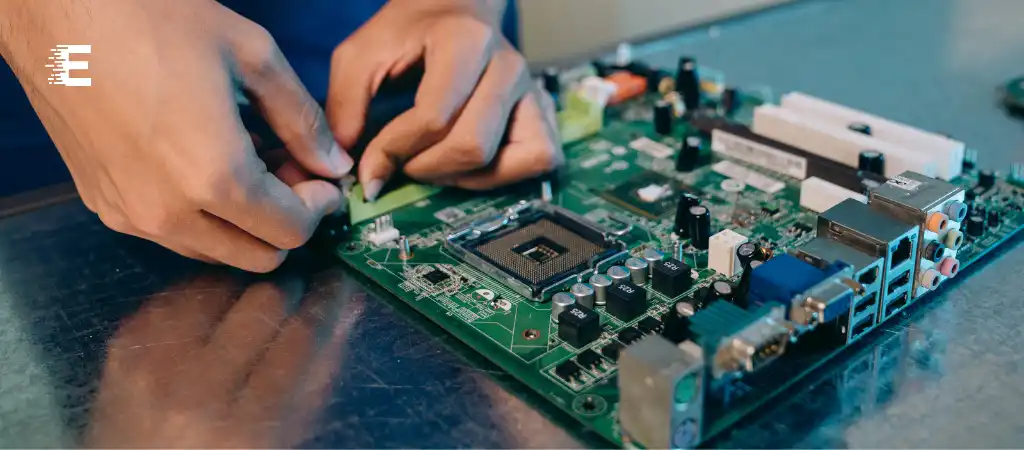
The motherboard is often referred to as the backbone of a computer system, playing a crucial role in its operation and performance. It is a complex and essential component that houses and connects various parts of a computer, ensuring they work harmoniously.
Understanding the functions of the motherboard is key to appreciating how a computer functions as a whole. This guide delves into The Five Functions Of The Motherboard, providing a detailed exploration of each.
The motherboard, also known as the mainboard or logic board, is the central printed circuit board (PCB) in many modern computers. It holds and allows communication between many crucial electronic components of a system, such as the central processing unit (CPU), memory, and connectors for input and output devices. Without a functional motherboard, a computer would be unable to operate.
The functions of the motherboard can be broadly categorized into five key areas: serving as the foundation of the computer, facilitating communication between components, providing power, managing data flow, and enabling expansion and connectivity.
The Five Functions of the Motherboard
Serving as the Foundation of the Computer
Physical Structure and Mounting
The motherboard provides the physical structure for mounting all other essential components of the computer. It is typically a large, flat, rectangular board that houses the CPU, RAM slots, and various connectors and ports. The design and layout of a motherboard ensure that all components are securely attached and properly aligned.
Housing Essential Components
The motherboard holds crucial components such as the CPU, memory (RAM), and chipset. These components are either directly mounted onto the motherboard or connected through various slots and sockets. The arrangement of these components on the motherboard is critical for efficient operation and thermal management.
Facilitating Communication Between Components
Bus Systems and Pathways
One of the primary functions of the motherboard is to facilitate communication between different parts of the computer. This is achieved through a series of buses, which are pathways that transmit data between the CPU, memory, and peripheral devices. The most common types of buses include the system bus, memory bus, and peripheral bus.
Chipset and Controllers
The chipset on the motherboard, usually consisting of the Northbridge and Southbridge, plays a vital role in managing data flow between the CPU, memory, and peripheral devices. The Northbridge typically handles communication between the CPU, RAM, and graphics card, while the Southbridge manages communication with other peripherals like hard drives and USB devices.
Providing Power
Power Distribution
The motherboard is responsible for distributing power from the power supply unit (PSU) to various components of the computer. This is achieved through a series of power connectors and voltage regulators. The PSU connects to the motherboard via the main power connector and supplementary connectors for the CPU and other high-power components.
Voltage Regulation
Voltage regulation is another crucial function of the motherboard. Voltage regulators on the motherboard ensure that each component receives the correct voltage level, protecting them from potential damage due to power fluctuations. These regulators convert the incoming power from the PSU to the appropriate voltages required by the CPU, RAM, and other components.
Managing Data Flow
Data Paths and Bandwidth
Efficient data flow management is essential for the optimal performance of a computer. The motherboard manages data flow through various data paths and bandwidth allocation. High-speed data paths, such as PCI Express (PCIe) lanes, are used to connect high-performance components like graphics cards and solid-state drives (SSDs).
Memory Management
The motherboard also plays a key role in memory management. It houses the RAM slots and manages the flow of data between the CPU and memory. The speed and type of RAM supported by the motherboard can significantly impact overall system performance. Modern motherboards support dual-channel or even quad-channel memory configurations to enhance data throughput and reduce latency.
Enabling Expansion and Connectivity
Expansion Slots
One of the key functions of the motherboard is to enable expansion and connectivity. This is facilitated through various expansion slots such as PCI, PCIe, and AGP slots. These slots allow users to add additional components like graphics cards, sound cards, network cards, and more, thereby enhancing the capabilities of the computer.
Connectivity Options
The motherboard provides a multitude of connectivity options for both internal and external devices. These include SATA connectors for storage devices, USB ports for peripherals, Ethernet ports for network connectivity, and audio jacks for sound output. The availability and variety of these connectivity options determine the versatility and expandability of the computer.
You Might Be Interested In
- What Is Ram and Rom and Its Types?
- Is Seagate Barracuda SSD Or HDD?
- What Is The Difference Between T7 SSD and T7 Touch SSD?
- Is My Passport a Good External Hard Drive?
- How fast is Crucial X8 1tb portable SSD?
Conclusion
In conclusion, the motherboard is the central hub of a computer, performing a myriad of critical functions that are essential for the operation and performance of the system. The five primary functions of the motherboard include serving as the foundation of the computer, facilitating communication between components, providing power, managing data flow, and enabling expansion and connectivity.
Each of these functions is vital in ensuring that the computer operates efficiently and effectively. By understanding the functions of the motherboard, users can make informed decisions when building or upgrading their computers, ensuring they select the right motherboard that meets their needs and enhances their computing experience.
FAQs
What is the primary role of a motherboard in a computer system?
The primary role of the motherboard is to act as the central hub that connects and integrates all the critical components of a computer system, such as the CPU, RAM, storage devices, and peripheral components.
It provides the physical structure for mounting these components and facilitates communication between them through various buses and pathways. Additionally, it distributes power from the power supply and manages data flow to ensure efficient operation of the entire system.
How does the motherboard facilitate communication between different components?
The motherboard facilitates communication between different components using a network of buses, chipsets, and controllers. The chipset, typically composed of the Northbridge and Southbridge, manages data flow between the CPU, memory, and peripheral devices.
The Northbridge handles high-speed communication between the CPU, RAM, and graphics card, while the Southbridge manages connections with slower peripherals such as hard drives and USB devices. Advanced communication protocols like HyperTransport and PCI Express (PCIe) further enhance data transfer speeds and efficiency.
What are the different types of expansion slots available on a motherboard, and what are they used for?
Motherboards feature various expansion slots to accommodate additional components and enhance the computer’s capabilities. The most common types of expansion slots include:
- PCI Express (PCIe) Slots: Used for high-performance components such as graphics cards, NVMe storage drives, and network cards.
- PCI Slots: Used for legacy expansion cards, though they are becoming less common in modern motherboards.
- AGP Slots: Specifically designed for older graphics cards, though largely obsolete today.
- M.2 Slots: Used for compact storage solutions like NVMe SSDs. These slots allow users to expand their system’s functionality by adding or upgrading components.
How does the motherboard manage power distribution and voltage regulation?
The motherboard manages power distribution by receiving power from the power supply unit (PSU) and distributing it to various components through power connectors and voltage regulators. The main power connector supplies the motherboard with primary power, while additional connectors provide power to the CPU and other high-power components.
Voltage regulators on the motherboard ensure that each component receives the correct voltage level, converting the incoming power from the PSU to appropriate voltages required by the CPU, RAM, and other components. This regulation protects the components from power fluctuations and ensures stable operation.
What connectivity options do motherboards typically provide for external devices?
Motherboards offer a wide range of connectivity options for external devices to enhance the system’s versatility and expandability. Common connectivity options include:
- USB Ports (Type-A and Type-C): For connecting peripherals such as keyboards, mice, external drives, and other USB devices.
- Ethernet Ports: For wired network connections, providing internet and local network access.
- Audio Jacks: For connecting speakers, headphones, and microphones.
- SATA Connectors: For connecting internal storage devices like HDDs and SSDs.
- Thunderbolt Ports: For high-speed data transfer and daisy-chaining multiple devices.
- HDMI/DisplayPort: For connecting monitors and other display devices. These connectivity options ensure that the motherboard can support a wide variety of external devices and peripherals, enhancing the computer’s overall functionality and user experience.
