


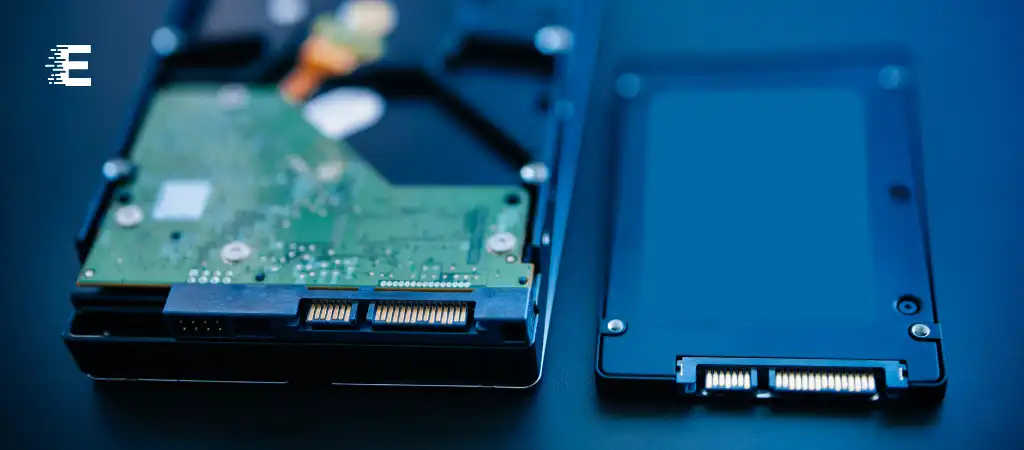
In the realm of digital storage, two technologies dominate the landscape: Solid State Drives (SSDs) and Hard Disk Drives (HDDs). Both serve the purpose of storing data in computers and other electronic devices, but they do so in vastly different ways. Understanding the differences between SSDs and HDDs is crucial for anyone looking to make informed decisions about their storage needs. What Is The Difference Between SSD and HDD?
In this comprehensive guide, we will delve into the intricacies of both technologies, exploring their construction, performance, advantages, disadvantages, and the scenarios where each excels.
The storage landscape has evolved significantly over the years, transitioning from the traditional Hard Disk Drives (HDDs) to the more modern Solid State Drives (SSDs). While both technologies serve the same purpose, they do so in fundamentally different ways. Understanding these differences is essential in determining which type of storage is best suited for your needs.
Construction and Technology
HDD Construction
HDDs consist of several key components, including spinning magnetic disks, read/write heads, and an actuator arm. The spinning disks, known as platters, are coated with a magnetic material that stores data in binary form. The read/write heads, situated on an actuator arm, move rapidly over the spinning platters to read or write data.
SSD Construction
SSDs, on the other hand, have a more complex but efficient construction. They contain no moving parts and instead utilize flash memory chips to store data. These memory chips, typically made of NAND-based flash memory, retain data even when the power is turned off. SSDs also include a controller that manages data storage, retrieval, and wear leveling to ensure optimal performance and longevity.
Performance
Speed
One of the most significant advantages of SSDs over HDDs is their speed. SSDs can access data almost instantly, thanks to their lack of moving parts. This results in faster boot times, quicker file transfers, and snappier overall system performance. HDDs, with their spinning platters and mechanical read/write heads, are inherently slower. They require time to spin up to speed and position the read/write heads over the correct location before data can be accessed.
Reliability
In terms of reliability, SSDs have a clear edge over HDDs. Since SSDs have no moving parts, they are less prone to mechanical failure. HDDs, on the other hand, are susceptible to wear and tear over time, leading to mechanical failures such as head crashes or motor failures. Additionally, SSDs are more resistant to physical shock and vibration, making them ideal for use in laptops and other portable devices.
Advantages and Disadvantages
Advantages of SSDs
-
Speed
SSDs offer significantly faster data access and transfer speeds compared to HDDs.
-
Reliability
With no moving parts, SSDs are more reliable and less prone to mechanical failure.
-
Durability
SSDs are more resistant to physical shock and vibration.
-
Noiseless Operation
SSDs operate silently since they have no moving parts.
-
Energy Efficiency
SSDs consume less power than HDDs, resulting in longer battery life for laptops and other portable devices.
Disadvantages of SSDs
-
Cost
SSDs are generally more expensive per gigabyte of storage compared to HDDs.
-
Limited Lifespan
While SSDs are more reliable, they have a limited number of write cycles before they begin to degrade.
-
Capacity
SSDs typically offer lower storage capacities compared to HDDs.
-
Performance Degradation
SSD performance may degrade over time, especially when nearing full capacity.
Advantages of HDDs
-
Cost-Effective Storage
HDDs offer a lower cost per gigabyte of storage compared to SSDs.
-
High Capacity
HDDs are available in larger storage capacities than SSDs.
-
Longevity
Despite their mechanical nature, HDDs can last for many years if properly maintained.
-
Mature Technology
HDDs have been around for decades and are a well-established technology.
Disadvantages of HDDs
-
Slower Speed
HDDs are slower than SSDs, especially in terms of random access times.
-
Mechanical Failure
HDDs are prone to mechanical failure due to their moving parts.
-
Noise and Heat
HDDs generate noise and heat during operation, which may be undesirable in certain environments.
-
Less Energy Efficient
HDDs consume more power than SSDs, leading to higher energy costs.
Applications and Use Cases
The choice between SSDs and HDDs often depends on the specific requirements of the application or use case.
-
SSD Applications
-
Operating System
SSDs are ideal for installing the operating system due to their speed and responsiveness.
-
Gaming
SSDs can significantly reduce loading times in games, providing a smoother gaming experience.
-
Professional Workloads
SSDs are well-suited for professional tasks such as video editing, 3D rendering, and software development, where fast storage access is crucial.
-
-
HDD Applications
-
Mass Storage
HDDs are suitable for storing large amounts of data, such as multimedia files, documents, and backups.
-
Archiving
HDDs are often used for long-term storage and archiving due to their high capacities and lower cost per gigabyte.
-
Network-Attached Storage (NAS)
HDDs are commonly used in NAS systems for storing and sharing files over a network.
-
You Might Be Interested In
- What Is an ALU?
- Is The Samsung T7 Good For Video Editing?
- What Does a GPU Do?
- What Is Ram and Rom and Its Types?
- Is Seagate Barracuda SSD Or HDD?
Conclusion
In conclusion, the Difference Between SSD and HDD is vast, each with its own set of advantages and disadvantages. SSDs excel in speed, reliability, and energy efficiency, making them ideal for applications where performance is paramount. On the other hand, HDDs offer cost-effective storage solutions with higher capacities, making them suitable for storing large amounts of data at a lower cost.
Ultimately, the choice between SSDs and HDDs depends on factors such as performance requirements, budget, and specific use cases. By understanding the strengths and weaknesses of each technology, users can make informed decisions to meet their storage needs.
FAQs About the Difference Between SSD and HDD
What are the main differences between SSDs and HDDs?
Solid State Drives (SSDs) and Hard Disk Drives (HDDs) differ primarily in their construction and technology. HDDs use spinning magnetic disks and mechanical read/write heads, while SSDs use flash memory chips with no moving parts. This fundamental difference leads to variations in speed, reliability, and other factors.
Which is faster, SSD or HDD?
SSDs are significantly faster than HDDs. Since SSDs have no moving parts, they can access data almost instantly, resulting in faster boot times, quicker file transfers, and snappier overall system performance. HDDs, with their spinning platters and mechanical read/write heads, are inherently slower and require time to spin up to speed and position the read/write heads.
Are SSDs more reliable than HDDs?
Yes, SSDs are generally more reliable than HDDs. Since SSDs have no moving parts, they are less prone to mechanical failure. Additionally, SSDs are more resistant to physical shock and vibration, making them ideal for portable devices like laptops. However, it’s important to note that SSDs have a limited number of write cycles before they begin to degrade, which may affect their long-term reliability.
What are the advantages of using SSDs over HDDs?
SSDs offer several advantages over HDDs, including:
- Faster speed: SSDs provide faster data access and transfer speeds.
- Higher reliability: SSDs have no moving parts, resulting in increased reliability and durability.
- Energy efficiency: SSDs consume less power than HDDs, leading to longer battery life in laptops and other portable devices.
- Noiseless operation: Since SSDs have no moving parts, they operate silently.
- Faster boot times: SSDs enable quicker system boot times compared to HDDs.
In what scenarios are HDDs preferred over SSDs?
HDDs are preferred over SSDs in scenarios where:
- Cost-effectiveness is crucial: HDDs offer a lower cost per gigabyte of storage compared to SSDs.
- Large storage capacities are needed: HDDs are available in larger capacities than SSDs.
- Long-term storage is required: HDDs are suitable for archiving and long-term storage due to their high capacities and lower cost per gigabyte.
- Mechanical failure isn’t a concern: In environments where shock and vibration aren’t significant factors, HDDs can be a reliable storage solution.
- Speed isn’t a priority: If high-speed data access isn’t critical for the application, HDDs can provide sufficient performance at a lower cost.
