


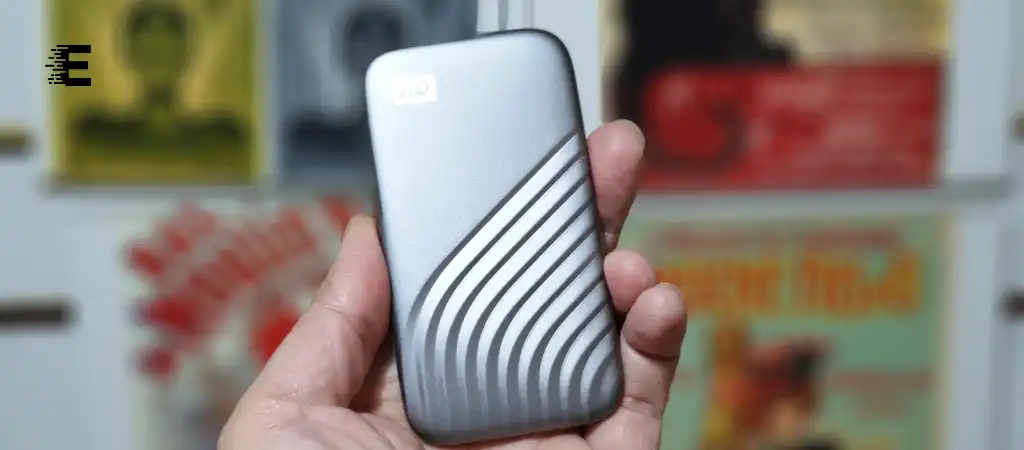
In an era where data storage and security have become paramount, choosing the right external hard drive is crucial. Among the myriad of options available, the Western Digital My Passport series has gained significant attention. But the question remains: Is My Passport A Good External Hard Drive?
In this comprehensive guide, we will dive deep into the features, performance, and reliability of the My Passport external hard drive series, helping you determine whether it’s the right choice for your storage needs, particularly if you’re considering the Best External SSD Drive.
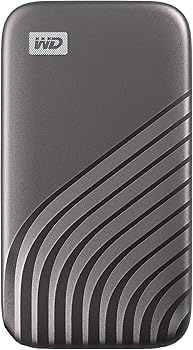
External Hard Drives
An external hard drive is a portable storage device that can be connected to a computer via USB, Thunderbolt, or other interfaces. It serves as an extension of your computer’s internal storage, providing additional space to store files, backup data, or transfer large amounts of information between devices.
Importance of Choosing the Right External Hard Drive
Selecting the right external hard drive is essential because it directly affects your data’s safety, accessibility, and performance. Factors such as storage capacity, speed, durability, and security features should all be considered when making a decision.
Overview of the My Passport External Hard Drive Series
Introduction to My Passport
The My Passport series is a line of external hard drives manufactured by Western Digital (WD), one of the leading names in data storage. Known for their compact design, high storage capacities, and reliability, My Passport drives are popular among consumers looking for a portable storage solution.
Key Features of My Passport
To answer the question, “Is My Passport A Good External Hard Drive?”, let’s first explore the key features that define the My Passport series:
-
Portability
My Passport drives are designed to be compact and lightweight, making them easy to carry around.
-
Storage Capacity
Available in a range of capacities from 1TB to 5TB, My Passport can accommodate various storage needs.
-
Connectivity
Equipped with USB 3.0 (and backward-compatible with USB 2.0), My Passport offers fast data transfer speeds.
-
Security
Built-in hardware encryption and password protection provide an additional layer of security for your data.
-
Backup Software
My Passport drives come with WD Backup software, allowing users to schedule automatic backups of their important files.
-
Durability
While not rugged, My Passport drives are built to withstand the rigors of everyday use.
Performance Analysis of My Passport
Speed and Efficiency
One of the primary concerns when evaluating an external hard drive is its speed. My Passport drives use USB 3.0 technology, which offers data transfer rates up to 5 Gbps. While this is more than sufficient for most users, it’s worth noting that actual performance can vary depending on factors like the size of the files being transferred and the device’s overall condition.
For instance, copying large video files or performing extensive backups will demonstrate the drive’s true capabilities. In most cases, My Passport delivers consistent performance, making it a reliable choice for everyday tasks.
Compatibility and Versatility
My Passport drives are compatible with both Windows and macOS systems, though macOS users may need to reformat the drive before use. This versatility makes My Passport a convenient option for users who work across different platforms.
Additionally, My Passport drives can be used with gaming consoles like the PlayStation and Xbox, making them a popular choice for gamers needing extra storage for their game libraries.
Reliability and Data Protection
When it comes to reliability, My Passport drives are generally well-regarded. Western Digital has a solid reputation for producing dependable storage solutions, and My Passport is no exception. The inclusion of hardware encryption and password protection further enhances data security, ensuring that your files remain safe from unauthorized access.
Moreover, the WD Backup software allows users to automate the backup process, reducing the risk of data loss due to hardware failure or accidental deletion. This feature is particularly valuable for users who want peace of mind knowing that their data is regularly backed up.
Comparing My Passport to Other External Hard Drives
My Passport vs. Seagate Backup Plus
Seagate’s Backup Plus series is another popular line of external hard drives that competes directly with My Passport. Both drives offer similar storage capacities, portability, and data transfer speeds. However, Seagate’s drives are often praised for their robust software suite, which includes features like cloud backup and social media management.
On the other hand, My Passport excels in data security, thanks to its built-in hardware encryption. If data protection is your top priority, My Passport may be the better choice. However, if you value additional software features, Seagate Backup Plus could be more appealing.
My Passport vs. Samsung T5 SSD
The Samsung T5 SSD represents a different category of external storage altogether. As a solid-state drive (SSD), the T5 offers significantly faster data transfer speeds and greater durability compared to traditional hard drives like My Passport. However, these advantages come at a higher price point and typically lower storage capacity.
For users who require blazing-fast speeds and are willing to pay a premium, the Samsung T5 SSD is an excellent choice. However, if you’re looking for a more affordable solution with ample storage, My Passport remains a strong contender.
My Passport vs. LaCie Rugged
LaCie’s Rugged series is known for its durability, making it a favorite among users who need an external hard drive that can withstand harsh environments. These drives are often used by photographers, videographers, and outdoor enthusiasts who require a rugged storage solution.
While My Passport offers decent durability for everyday use, it doesn’t match the ruggedness of LaCie drives. However, if you don’t need the added protection of a rugged drive, My Passport offers better value for money with its combination of features and affordability.
Is My Passport A Good External Hard Drive? – Use Cases
For Everyday Use
If you’re a casual user who needs extra storage for photos, videos, documents, and other files, My Passport is an excellent choice. Its combination of portability, ease of use, and sufficient storage capacity makes it ideal for everyday tasks.
For Backing Up Important Files
My Passport’s built-in security features and WD Backup software make it a strong candidate for users looking to back up their important files. Whether it’s family photos, work documents, or your music library, My Passport ensures that your data is protected and easily accessible.
For Professionals
For professionals who need reliable storage on the go, My Passport offers a good balance of performance, security, and portability. However, if you require faster data transfer speeds or more advanced features, you may want to consider other options like SSDs or drives with additional software capabilities.
For Gamers
As mentioned earlier, My Passport is compatible with gaming consoles and can be used to expand your storage for games, saves, and media files. While it may not offer the fastest loading times compared to SSDs, it provides an affordable way to increase your console’s storage capacity.
Pros and Cons of My Passport External Hard Drives
Pros
- Affordability: My Passport drives offer a good balance of features at a reasonable price.
- Portability: Compact and lightweight, making it easy to carry around.
- Security: Built-in hardware encryption and password protection.
- Backup Software: Includes WD Backup software for automatic backups.
- Compatibility: Works with both Windows and macOS, and can be used with gaming consoles.
Cons
- Speed: While sufficient for most users, My Passport’s data transfer speeds are not as fast as SSDs.
- Durability: Not as rugged as other options like LaCie Rugged drives.
- Software Features: Lacks some advanced features found in competing products, such as cloud backup.
You Might Be Interested In
- How fast is Crucial X8 1tb portable SSD?
- What Is Batch Size In Machine Learning?
- What Is The Life Expectancy Of A Wd Passport?
- Is The Samsung T7 Good For Video Editing?
- What Type Of Processor Is a GPU?
Conclusion
After a thorough examination of its features, performance, and comparison with other external hard drives, it’s clear that My Passport is indeed a good external hard drive for many users. Its combination of portability, security, and affordability makes it an attractive option for everyday use, backups, and even professional applications.
However, like any product, it’s important to consider your specific needs before making a purchase. If you prioritize speed and durability, you might want to explore SSD options or rugged drives. But if you’re looking for a reliable, versatile, and cost-effective external hard drive, My Passport is a solid choice.
In conclusion, Is My Passport A Good External Hard Drive? The answer is yes, especially for users who value a good balance of features at an affordable price point.
FAQs about Is My Passport External Hard Drives?
Is My Passport External Hard Drive Compatible with Both Windows and macOS?
Yes, My Passport external hard drives are compatible with both Windows and macOS. However, out of the box, My Passport drives are typically formatted in NTFS (New Technology File System), which is designed for Windows. If you are using a Mac, you will need to reformat the drive to the HFS+ (Hierarchical File System Plus) format, or you can use exFAT, which is compatible with both operating systems without the need for reformatting. Western Digital provides clear instructions on how to reformat the drive if necessary.
How Secure is My Passport External Hard Drive?
My Passport external hard drives come with built-in 256-bit AES hardware encryption and password protection, making them highly secure. This means that even if the drive is lost or stolen, the data stored on it remains inaccessible without the correct password.
The hardware encryption ensures that your data is protected without compromising the drive’s performance. Additionally, the included WD Security software makes it easy to set up and manage your security settings.
Can My Passport External Hard Drive Be Used for Gaming Consoles?
Yes, My Passport external hard drives are compatible with major gaming consoles like the PlayStation and Xbox. They can be used to expand the storage capacity of your console, allowing you to store more games, save files, and media content.
When using My Passport with a gaming console, you will need to format the drive to be recognized by the console, which is a straightforward process. Once formatted, the drive can be used to directly install and run games, although the loading speeds may not be as fast as those on an SSD.
How Reliable is My Passport for Long-Term Data Storage?
My Passport external hard drives are generally considered reliable for long-term data storage. Western Digital has a strong reputation for producing durable and dependable storage devices. The drive’s reliability is enhanced by features such as hardware encryption, password protection, and the WD Backup software, which helps users regularly back up their important data.
However, as with any mechanical hard drive, it is advisable to use My Passport in conjunction with another backup solution to ensure maximum data security and longevity.
What Are the Data Transfer Speeds of My Passport External Hard Drive?
My Passport external hard drives use USB 3.0 technology, offering data transfer speeds of up to 5 Gbps. While these speeds are more than adequate for most users, including those transferring large files or performing backups, it is important to note that actual speeds can vary depending on the type of files being transferred, the condition of the drive, and the device it is connected to.
For users who need faster data transfer speeds, particularly for tasks like video editing or running applications directly from the drive, an SSD (Solid State Drive) may be a better option.
