


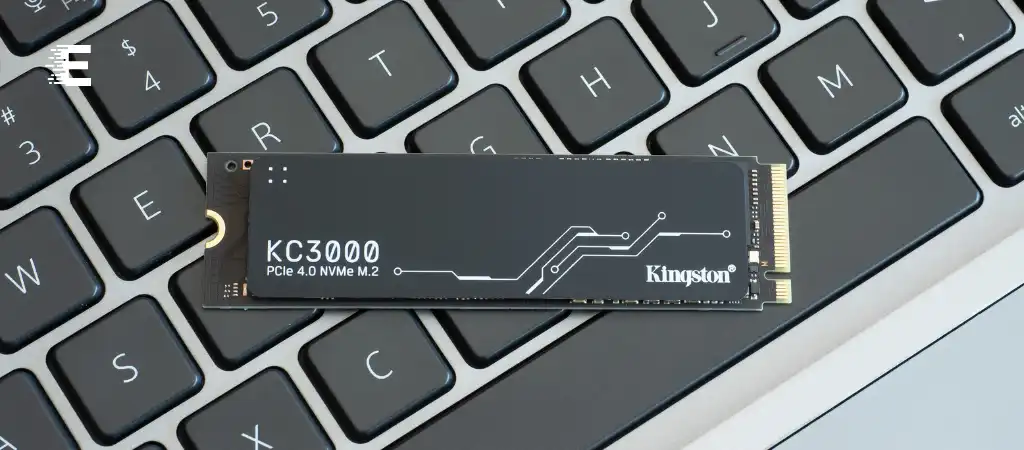
In recent years, the conversation around data storage solutions has intensified, especially with the advent of new technologies. The debate often centers around two primary types of storage: NVMe (Non-Volatile Memory Express) and SATA (Serial ATA). Both have their own advantages and applications, but the question remains: Is NVMe better than SATA?
This comprehensive guide aims to delve into the technicalities, performance metrics, and practical applications to provide a thorough comparison between NVMe and SATA.
NVMe and SATA
What is SATA?
SATA, or Serial ATA, is a computer bus interface that connects host bus adapters to mass storage devices such as hard disk drives (HDDs), optical drives, and solid-state drives (SSDs). Introduced in 2000, SATA has been a prevalent standard due to its simplicity, reliability, and affordability.
Key Features of SATA
-
Speed
SATA III, the latest version, offers a maximum data transfer speed of 6 Gb/s (600 MB/s).
-
Compatibility
Widely compatible with a variety of devices and motherboards.
-
Form Factors
Commonly found in 2.5-inch and 3.5-inch form factors for SSDs and HDDs, respectively.
What is NVMe?
NVMe, or Non-Volatile Memory Express, is a newer storage interface and protocol designed specifically for SSDs. NVMe leverages the high-speed PCIe (Peripheral Component Interconnect Express) bus, allowing for significantly faster data transfer rates and lower latency compared to SATA.
Key Features of NVMe
-
Speed
Utilizes PCIe lanes to achieve data transfer speeds up to 32 Gb/s (4000 MB/s) with PCIe 3.0 and even higher with PCIe 4.0 and 5.0.
-
Latency
Much lower latency due to more efficient queuing and parallel processing capabilities.
-
Form Factors
Commonly found in M.2 and U.2 form factors, allowing for more compact and versatile storage solutions.
Performance Comparison
Speed and Bandwidth
One of the most critical factors in determining whether NVMe is better than SATA is speed. NVMe SSDs offer a substantial performance advantage over SATA SSDs due to their use of the PCIe bus.
NVMe Speed
- PCIe 3.0: Up to 32 Gb/s.
- PCIe 4.0: Up to 64 Gb/s.
- PCIe 5.0: Potentially up to 128 Gb/s.
SATA Speed
- SATA III: Maxes out at 6 Gb/s.
Latency
Latency, or the delay before a transfer of data begins following an instruction, is another crucial metric. NVMe SSDs are designed to reduce latency significantly, thanks to their direct connection to the CPU via the PCIe bus and more efficient command structures.
NVMe Latency
-
Lower Command Latency
Due to streamlined, parallel command queues.
-
Lower Response Time
Results in faster data access and transfer.
SATA Latency
-
Higher Command Latency
Traditional command structures with fewer parallel processes.
-
Higher Response Time
Slower data access and transfer compared to NVMe.
Architectural Differences
Command Queuing
NVMe:
-
Parallel Command Queues:
Can handle up to 64,000 commands per queue with 64,000 queues.
-
Efficiency:
Improved performance in multi-threaded environments due to parallelism.
SATA
-
Single Command Queue
Limited to 32 commands per queue.
-
Bottlenecks
Potential for bottlenecks in high-demand scenarios.
Bus Interface
NVMe
-
PCIe Interface
Direct connection to the CPU allows for higher throughput and lower latency.
-
Scalability
Easily scalable with additional PCIe lanes.
SATA
-
AHCI Interface
Traditional interface designed initially for slower spinning disk drives.
-
Limitations
Less efficient in handling high-speed data transfer required by modern SSDs.
Practical Applications
Consumer Use
For everyday consumer applications, such as gaming, content creation, and general computing, NVMe SSDs provide a noticeable performance boost.
Gaming
-
Faster Load Times
Reduced game loading times and smoother gameplay experiences.
-
Quick Installations
Speedier game installations and updates.
Content Creation
-
High-Speed Transfers
Faster data transfer for large files like videos and high-resolution images.
-
Efficient Workflows
Improved efficiency in workflows involving frequent read/write operations.
Enterprise Use
In enterprise environments, where data processing speed and reliability are paramount, NVMe SSDs are increasingly preferred.
Data Centers
-
Scalability
Higher scalability for growing data storage needs.
-
Performance
Improved performance for virtual machines and databases.
High-Performance Computing (HPC)
-
Speed
Enhanced speed for processing large datasets and complex computations.
-
Reliability
Greater reliability and longevity under constant high-demand conditions.
Cost Considerations
Price Per GB
One of the primary considerations for consumers and enterprises alike is the cost per gigabyte of storage. Historically, SATA SSDs have been more affordable compared to NVMe SSDs. However, the gap is narrowing as NVMe technology becomes more mainstream.
NVMe
-
Higher Initial Cost
Generally higher price per GB compared to SATA.
-
Long-Term Value
Better performance and efficiency can translate to long-term cost savings.
SATA
-
Lower Initial Cost
More affordable for budget-conscious consumers and businesses.
-
Adequate Performance
Sufficient for less demanding applications and older systems.
Total Cost of Ownership (TCO)
When evaluating the total cost of ownership, NVMe SSDs may offer better value despite the higher initial investment.
NVMe
-
Operational Savings
Reduced energy consumption and cooling requirements due to higher efficiency.
-
Longevity
Longer lifespan under high-demand usage can reduce replacement costs.
SATA
-
Initial Savings
Lower upfront costs but may require more frequent replacements and higher energy consumption over time.
Future Trends
Technological Advancements
The storage industry continues to evolve, with ongoing advancements in NVMe technology promising even greater performance improvements.
PCIe 5.0 and Beyond
-
Speed Increases
Future iterations of PCIe will further enhance NVMe speeds.
-
Wider Adoption
Increasing adoption in both consumer and enterprise markets.
Market Trends
Market trends indicate a growing preference for NVMe SSDs, driven by their superior performance and decreasing costs.
Consumer Market
-
Gaming and Multimedia
Growing demand for high-speed storage solutions.
-
Laptops and Ultrabooks
Increasing inclusion of NVMe SSDs in new devices.
Enterprise Market
-
Data Center Upgrades
Ongoing upgrades to NVMe storage for improved efficiency.
-
Cloud Computing
Enhanced performance for cloud-based services and applications.
You Might Be Interested In
- How Many Processors Are On A GPU?
- How Do CPUs Work?
- How To Become a Machine Learning Engineer?
- What Type Of Processor Is a GPU?
- How Do I Compare Graphics Cards?
Conclusion
So, is NVMe better than SATA? The answer largely depends on the specific needs and use cases of the user. For those seeking the highest possible performance, especially in data-intensive applications, NVMe SSDs offer clear advantages in terms of speed, latency, and overall efficiency. NVMe’s ability to handle vast amounts of data quickly and reliably makes it the superior choice for both consumer and enterprise applications where performance is critical.
On the other hand, SATA SSDs remain a viable option for users with more modest performance requirements or budget constraints. They provide adequate speed and reliability for everyday tasks and less demanding environments.
In summary, while SATA continues to hold a place in the storage market due to its affordability and compatibility, NVMe is undoubtedly the better choice for those prioritizing performance and future-proofing their systems. As the technology matures and becomes more accessible, the benefits of NVMe are likely to become even more pronounced, solidifying its position as the superior storage solution.
FAQs on “Is NVMe Better Than SATA?”
What are the primary differences between NVMe and SATA?
The main differences between NVMe and SATA lie in their speed, latency, and bus interface. NVMe uses the PCIe bus, which offers much higher data transfer rates (up to 32 Gb/s with PCIe 3.0 and beyond with newer versions) compared to SATA’s maximum of 6 Gb/s with SATA III. NVMe also has significantly lower latency due to its efficient queuing and parallel processing capabilities, while SATA uses an older AHCI interface with limited command queuing.
Is NVMe more expensive than SATA, and is it worth the investment?
NVMe SSDs are generally more expensive per gigabyte than SATA SSDs. However, the price gap is narrowing as NVMe technology becomes more widespread. The investment is often worth it for users who need high-speed data transfer, low latency, and better performance for tasks such as gaming, content creation, and enterprise applications. NVMe’s efficiency and longevity can also lead to long-term cost savings.
Can I use an NVMe SSD on any computer?
To use an NVMe SSD, your computer’s motherboard must have an M.2 or U.2 slot that supports NVMe drives. Additionally, the motherboard should have PCIe lanes available for optimal performance. While many modern motherboards include these slots, older systems may not be compatible. It’s important to check your motherboard’s specifications before purchasing an NVMe SSD.
How does NVMe improve gaming performance compared to SATA?
NVMe SSDs improve gaming performance by significantly reducing load times, enabling faster game installations, and providing smoother gameplay experiences. The higher data transfer rates and lower latency of NVMe SSDs allow for quicker access to game data, which is particularly beneficial in open-world games and titles with large assets that need to be loaded on the fly.
What are the benefits of NVMe for enterprise applications?
In enterprise environments, NVMe SSDs offer several benefits, including higher scalability, improved performance for virtual machines and databases, and enhanced speed for processing large datasets and complex computations. NVMe’s ability to handle high-demand applications efficiently and reliably makes it a superior choice for data centers, cloud computing, and high-performance computing (HPC) environments. The reduced energy consumption and cooling requirements also contribute to lower operational costs.
