


The term GPU (Graphics Processing Unit) is often used interchangeably with Graphics Card by many people, especially in casual conversations. However, while these two terms are closely related and play a crucial role in rendering graphics on your computer screen, they are not exactly the same thing.
Understanding the difference between a GPU and a graphics card is important for anyone looking to upgrade their PC, engage in gaming, or dive into GPU-intensive tasks such as video editing or machine learning. Is a GPU a Graphics Card?
In this comprehensive guide, we will explore the roles of the GPU and the graphics card, how they differ, their functions, and why these distinctions matter when selecting hardware for your computing needs.
What is a GPU (Graphics Processing Unit)?
A GPU, or Graphics Processing Unit, is a specialized electronic circuit designed to accelerate the creation of images and visual content intended for output on a display. GPUs are optimized for parallel processing, making them extremely efficient at handling multiple tasks simultaneously, particularly those related to graphics rendering.
GPUs were initially developed for rendering 2D and 3D graphics, but their use has expanded significantly beyond just gaming and visualization tasks. Today, GPUs are used in various fields such as machine learning, deep learning, artificial intelligence, and cryptocurrency mining, due to their ability to handle large volumes of data in parallel.
How a GPU Works
At its core, a GPU processes data related to the pixels on a display. Unlike a Central Processing Unit (CPU), which is a general-purpose processor capable of performing multiple types of tasks, a GPU is specialized for tasks related to graphics. Its architecture is designed to process many smaller tasks at the same time, which is particularly beneficial in rendering images, running simulations, and handling video games where high frame rates and real-time image processing are critical.
GPUs break down complex mathematical equations that define how objects and light interact in a scene, calculating things like:
- Shading: How light interacts with surfaces.
- Textures: The surface appearance of objects.
- Lighting effects: Reflections, refractions, and shadows.
- Geometry: How 3D objects are constructed from polygons and vertices.
What is a Graphics Card?
Definition and Components of a Graphics Card
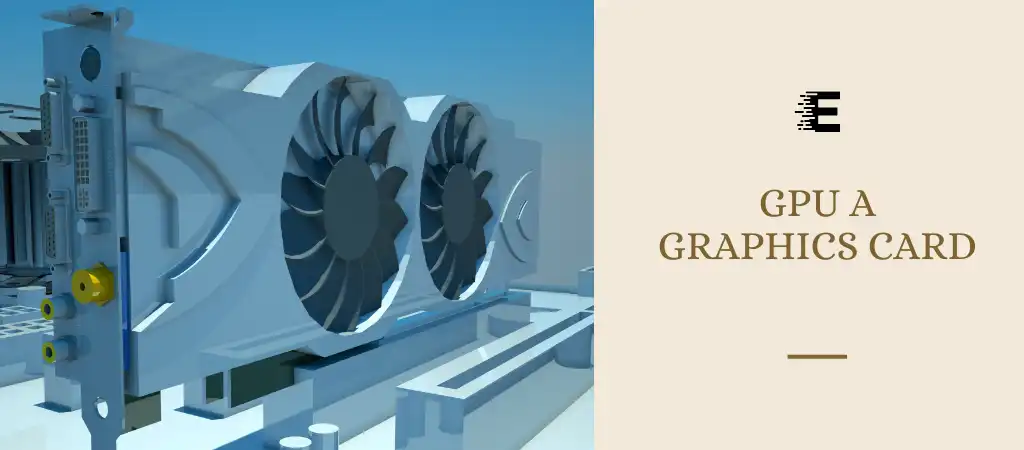
A Graphics Card is the complete hardware component that houses the GPU. It is a piece of hardware that connects to your computer’s motherboard via an expansion slot (usually PCIe) and works to render images, animations, and videos.
The graphics card doesn’t only contain the GPU but also other crucial components that support the GPU’s operation, including:
-
GPU (Graphics Processing Unit)
The actual processor that handles the rendering of images.
-
Video Memory (VRAM)
Dedicated memory that stores frame buffers, pixel data, textures, and other graphical data.
-
Cooling system
Heat sinks, fans, or liquid cooling systems to dissipate heat generated by the GPU during high-demand operations.
-
Power Regulation Components
Ensuring the GPU gets the correct amount of power from the PSU (Power Supply Unit).
-
Interface Connectors
HDMI, DisplayPort, or DVI connectors to output visual data to a monitor.
How a Graphics Card Works
When a graphics card receives instructions from the CPU, it processes the information and translates it into visuals that are displayed on your screen. The GPU does the heavy lifting of computation, while the memory stores necessary data, and the card’s physical components ensure smooth operations.
Graphics cards also serve as an intermediary between your monitor and the computer’s motherboard. The information processed by the CPU is sent to the graphics card, which then takes over the task of rendering the image and outputs it to the monitor in a format that can be displayed visually.
Types of Graphics Cards
Graphics cards come in two main varieties:
-
Integrated Graphics
Built directly into the CPU or motherboard. Integrated GPUs share system memory with the CPU, which limits their performance compared to dedicated solutions.
-
Dedicated Graphics Cards
Standalone components installed in a computer’s PCIe slot. These cards have their own GPU and VRAM, offering significantly higher performance than integrated solutions, which is essential for gaming, video editing, and other graphics-heavy tasks.
The Difference Between a GPU and a Graphics Card
Component vs. Device
The GPU is just a chip – the actual processor that handles computations related to graphics. On the other hand, a Graphics Card is the entire piece of hardware that contains the GPU along with other components like VRAM and cooling solutions. The graphics card is a complete unit that plugs into the motherboard and interacts with the rest of the system.
Functionality
While the GPU performs the mathematical calculations to render graphics, the graphics card is responsible for ensuring that the GPU has the necessary power, memory, and cooling to perform those calculations efficiently. Without the other components on the graphics card, the GPU wouldn’t be able to function as expected.
Integration and Installation
In the case of laptops or smaller devices, the GPU is often integrated directly onto the motherboard and shares system resources (like memory). Dedicated graphics cards, on the other hand, contain their own GPU and memory, and are installed into a PCIe slot on the motherboard for significantly higher performance.
Why Do People Confuse GPUs with Graphics Cards?
Marketing Terminology
Many manufacturers and retailers use the terms “GPU” and “Graphics Card” interchangeably in marketing materials. For instance, NVIDIA and AMD, the two major manufacturers of GPUs, often refer to their graphics cards as “GPUs” because the GPU is the star of the show and the key component that consumers focus on when making a purchase.
Simplification
In casual conversation, people often use “GPU” as shorthand for the entire graphics card because most users aren’t concerned with the specific components that make up a graphics card. When someone says they “bought a new GPU,” they likely mean they’ve purchased a new graphics card, which includes the GPU.
Focus on the GPU
The GPU is the most significant component within the graphics card. Its performance largely dictates the overall performance of the graphics card. Hence, people often refer to the whole graphics card as a “GPU” when in reality, it’s only one part of the entire unit.
Do You Need a GPU or a Graphics Card?
For General Use
If you only use your computer for basic tasks like web browsing, streaming video, or working with documents, an integrated GPU (built into your CPU) is often sufficient. Many modern CPUs, especially those from Intel and AMD, come with integrated graphics that are capable of handling everyday computing tasks.
For Gaming
Gamers and those who need to perform graphically intense tasks will need a dedicated graphics card. The more demanding the games or applications, the more powerful your graphics card needs to be. High-end games require a dedicated card with more VRAM and a powerful GPU to handle high frame rates, complex shaders, and detailed textures.
For Professional Work
Tasks like video editing, 3D rendering, and CAD (computer-aided design) benefit significantly from a powerful GPU. Professionals working in these fields will benefit from graphics cards with larger memory buffers and high computational power, such as those found in NVIDIA’s Quadro or AMD’s Radeon Pro series.
For Machine Learning and AI
Recently, GPUs have become crucial in fields like AI and machine learning. These tasks involve processing vast amounts of data in parallel, something GPUs excel at. Researchers and developers in these fields opt for powerful GPUs, such as NVIDIA’s Tesla or AMD’s Instinct, due to their ability to accelerate computations in neural networks and deep learning algorithms.
Choosing the Right Graphics Card (or GPU)
Key Specifications to Consider
When looking to purchase a graphics card, or determining if your GPU is the right fit, here are the essential specifications to focus on:
-
GPU Architecture
Modern GPUs from NVIDIA (like Ampere or Ada Lovelace) or AMD (like RDNA 2) are built on architectures optimized for speed, efficiency, and graphical capabilities.
-
VRAM (Video RAM)
The amount of memory is crucial for gaming and rendering large graphics files. Cards with more VRAM are better suited for tasks involving 4K resolution, detailed textures, and large datasets.
-
Clock Speed
Measured in MHz, this refers to how fast the GPU can process information. Higher clock speeds usually indicate better performance, though efficiency and architecture play an essential role too.
-
TDP (Thermal Design Power)
This number, measured in watts, indicates how much power the card will consume and the level of cooling required. High TDP cards may need advanced cooling solutions and a more robust power supply.
-
Ports and Connectivity
Ensure that the card has the right display output options (HDMI, DisplayPort, etc.) and enough connectors to match your monitors.
You Might Be Interested In
- What Are The Disadvantages Of Portable SSD?
- Is 1TB SSD Good for Gaming?
- What Does a Graphics Card Do In a Computer?
- Which Type Of DDR Ram Have Non-ecc And Ecc Types?
- Is Nvme Better Than Sata?
Conclusion
In conclusion, while people often use “GPU” and “Graphics Card” interchangeably, they are not the same thing. The GPU is the processor that handles rendering and graphical computations, while the Graphics Card is the hardware component that houses the GPU and other essential parts like memory and cooling systems. Understanding the distinction between these two terms is crucial when selecting the right hardware for your needs, whether you’re gaming, working professionally with high-end graphics, or diving into machine learning.
With advancements in technology, the lines between these terms may blur further, but it’s essential to remember that the GPU is a part of the larger Graphics Card and that both work in tandem to deliver the visual experiences we enjoy today.
FAQs about Is A Gpu A Graphics Card?
Is a GPU the same as a graphics card?
A GPU is not the same as a graphics card, although the terms are often used interchangeably. The GPU, or Graphics Processing Unit, is a specialized chip that handles the processing of graphics and complex visual data. It is the core component responsible for tasks such as rendering images, video, and 3D models.
The graphics card, on the other hand, is the entire piece of hardware that houses the GPU and includes additional components like VRAM (video memory), a cooling system, and connectors for display output.
The graphics card functions as the complete package that connects to the computer’s motherboard and provides the GPU with the necessary resources to function optimally. Without the rest of the graphics card components, the GPU alone wouldn’t be able to perform efficiently. In essence, the graphics card is the physical device, and the GPU is the specific chip within that device responsible for processing graphics-related tasks.
What is the difference between integrated and dedicated GPUs?
Integrated GPUs are built directly into the CPU or motherboard and share system memory with the CPU. These are typically found in laptops and budget desktop computers. Integrated GPUs are designed to handle basic graphics tasks, such as displaying video, running productivity software, or casual gaming.
However, because they rely on the system’s shared memory, they are not as powerful as dedicated GPUs when it comes to more graphically intensive tasks such as high-end gaming, video editing, or 3D rendering.
On the other hand, dedicated GPUs are standalone components housed within a graphics card. These GPUs have their own dedicated video memory (VRAM) and do not rely on the system’s RAM, which results in significantly better performance. Dedicated GPUs are essential for running graphically demanding applications, rendering high-resolution videos, or playing modern video games at high settings. They offer superior power, greater frame rates, and better efficiency for tasks that require heavy visual processing.
Why is VRAM important in a graphics card?
VRAM (Video RAM) is an essential component of any graphics card as it stores the data and textures that the GPU needs to access quickly during rendering processes. When you run a game, edit a video, or perform any task that requires processing visual data, VRAM holds information such as textures, frame buffers, and shaders. The more VRAM a graphics card has, the larger the datasets it can manage efficiently, which is crucial for running high-resolution content, gaming at 4K, or rendering detailed 3D models.
Without sufficient VRAM, the GPU has to access data from the system’s slower RAM, leading to potential performance bottlenecks such as frame drops, stuttering, or graphical glitches. Therefore, if you’re planning on performing tasks that involve high-end gaming, video editing, or 3D modeling, it’s essential to have a graphics card with enough VRAM. For example, most modern AAA games suggest at least 6GB to 8GB of VRAM for smooth performance at higher resolutions.
How does the cooling system affect GPU performance?
The cooling system of a graphics card is crucial in maintaining the optimal performance of the GPU. During intensive tasks like gaming, video rendering, or running complex simulations, the GPU generates significant amounts of heat. If this heat is not dissipated effectively, it can lead to thermal throttling, where the GPU slows down to prevent overheating. Thermal throttling decreases overall performance and can shorten the lifespan of the graphics card.
Most modern graphics cards come equipped with cooling solutions such as fans, heat sinks, or even liquid cooling systems. These are designed to keep the GPU’s temperature within an optimal range during heavy usage. For gamers and professionals who perform GPU-intensive tasks, it’s essential to have a well-cooled system, especially in high-performance builds where the GPU is constantly under load. Investing in a graphics card with an effective cooling system or upgrading to an aftermarket cooling solution can help ensure long-term stability and consistent performance.
Can you upgrade a laptop’s GPU?
In most cases, upgrading a laptop’s GPU is not possible, especially if the laptop uses an integrated GPU, which is directly soldered onto the motherboard or part of the CPU. Integrated GPUs share system resources, and since they are physically integrated into the motherboard, they cannot be swapped out or upgraded like a dedicated graphics card in a desktop PC.
However, some high-end gaming laptops or workstations come with dedicated GPUs that may offer limited upgradability. Certain laptops have modular designs where the GPU can be upgraded, but this is rare, and even in these cases, compatibility issues may arise. Another option for laptop users looking to upgrade their graphics performance is using an external GPU (eGPU), which connects to the laptop via Thunderbolt or USB-C. This allows users to run a more powerful dedicated GPU externally, boosting performance for gaming or professional applications without opening the laptop’s chassis.
