


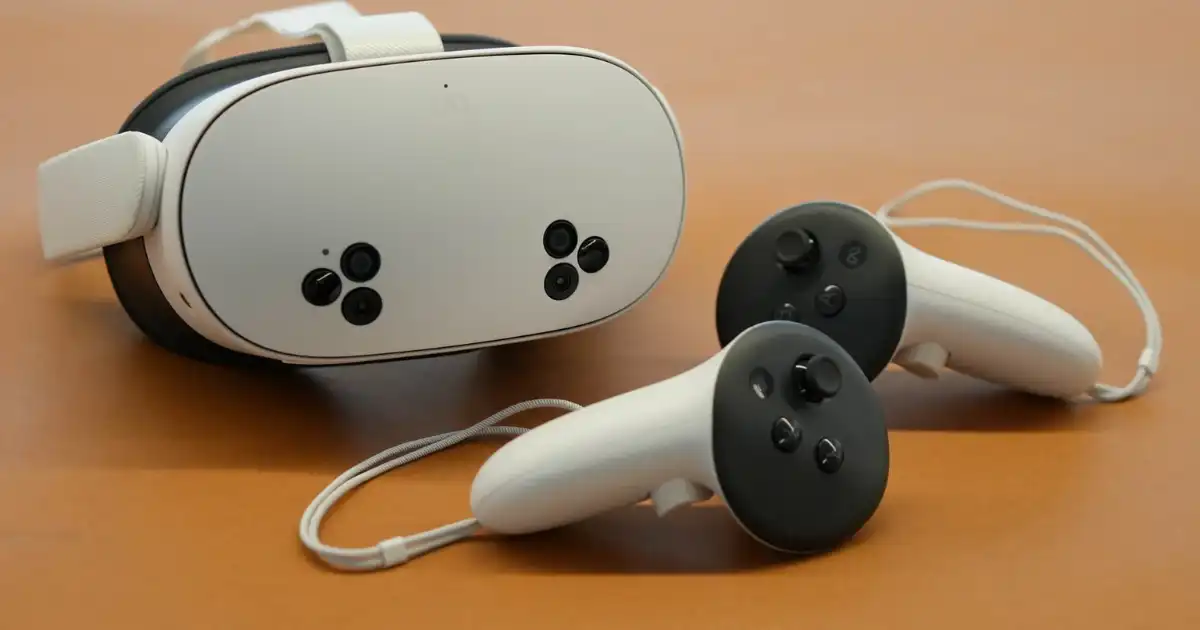
If you’ve only experienced AR or VR through YouTube demos or tech marketing videos, you’re missing the most important part: how these headsets actually feel to use for more than five minutes. Best Ar/vr Headsets (comparison)
On paper, they all promise immersion, productivity, or “the future of computing.” In practice, some will make you grin like an idiot, some will collect dust on your shelf, and some will quietly change how you work or play if you pick the right one for your life.
I’ve used AR and VR headsets for gaming, fitness, work, design reviews, remote collaboration, and just messing around at home. I’ve also watched plenty of people buy the “wrong” headset, get hyped for two weeks, and then stop using it because it’s uncomfortable, annoying to set up, or doesn’t have the content they actually want.
This guide is about how AR and VR headsets really work in practice, what to expect once the novelty wears off, how today’s top headsets compare in 2026, and how to choose one that won’t become an expensive paperweight.
AR vs VR
Before we talk about specific headsets, you need to understand the practical difference between AR and VR, because this alone determines whether you’ll love your headset or barely touch it.
What VR Feels Like in Practice
VR (Virtual Reality) fully replaces your view of the world with a digital environment.
You put the headset on, and:
-
Your room disappears
-
Your brain is tricked into believing you’re somewhere else
-
You move your head, and the world moves with you
-
You interact with controllers or your hands
This is what most people imagine when they hear “VR.”
It’s great for:
-
Gaming
-
Fitness
-
Immersive experiences (flight sims, rhythm games, virtual travel)
-
Focused sessions where you want to be cut off from the real world
The catch
VR is isolating. That’s the point but it also means you won’t casually wear it for hours while doing chores or chatting with people in the room. VR sessions tend to be intentional: “I’m going into VR now.”
What AR / Mixed Reality Feels Like in Practice
AR (Augmented Reality) overlays digital content onto your real environment. Most modern headsets actually do mixed reality: cameras show you the real world, and virtual stuff is layered on top.
In practice:
-
You can see your room
-
You can see people around you
-
Virtual screens, objects, or characters appear in your space
-
You’re less disconnected from reality
This is better for:
-
Watching videos while still seeing your surroundings
-
Productivity setups (virtual monitors)
-
Light gaming
-
Design visualization
-
Social or collaborative use
The catch
AR headsets are heavier, more complex, and harder to get “right.” If the passthrough cameras aren’t good, the whole experience feels fake and uncomfortable.
How AR/VR Headsets Actually Work
You don’t need to understand optics engineering to use these things, but there are a few practical concepts that affect daily experience:
Displays & Lenses
Higher resolution doesn’t just mean sharper text.
It also:
-
Reduces eye strain
-
Makes virtual monitors usable for work
-
Makes small UI elements readable
Bad lenses cause:
-
Blurry edges
-
Eye fatigue
-
Nausea for some people
In my experience, lens quality matters more than raw resolution numbers once you pass a basic threshold.
Tracking
Tracking is how the headset knows where your head and hands are.
Good tracking:
-
Feels invisible
-
Makes your virtual hands feel “attached” to you
-
Keeps virtual objects stable in space
Bad tracking:
-
Breaks immersion
-
Makes aiming in games annoying
-
Makes productivity tools frustrating
Comfort
This is the #1 reason people stop using headsets.
Things that matter:
-
Weight distribution
-
Face pressure
-
Head strap design
-
Heat buildup
-
How sweaty your face gets
If a headset hurts your face or neck after 20 minutes, it doesn’t matter how powerful it is you won’t use it.
Best AR & VR Headsets in 2026
Here’s how the major headsets stack up based on actual usage, not spec sheets.
Meta Quest 3
What it’s like to use
This is the “just works” headset. You put it on, and within minutes you’re in a game, app, or mixed reality mode. No cables. No PC required.
Key features
-
Standalone VR (no PC needed)
-
Solid mixed reality passthrough
-
Massive content library
-
Good hand tracking
Pros
-
Best value for most people
-
Huge game and app ecosystem
-
Easy to set up
-
Great for fitness and casual gaming
Cons
-
Not premium-feeling
-
Comfort out of the box is okay, not great
-
Passthrough still looks like video, not real life
-
Battery life limits long sessions
Ideal for
First-time VR users, casual gamers, fitness users, families, social VR.
Practical tip
Budget for a better head strap. The stock one works, but a good strap turns it from “okay for 30 minutes” into “comfortable for an hour or two.”
Apple Vision Pro
What it’s like to use
This feels like wearing a very expensive future prototype. The visuals are stunning. Text looks real. Video feels like you’re in a private cinema. Then your neck reminds you there’s a brick on your face.
Key features
-
Extremely high-resolution displays
-
Best-in-class passthrough
-
Eye + hand tracking
-
Tight Apple ecosystem integration
Pros
-
Unmatched visual clarity
-
Incredible for movies and spatial video
-
Best mixed reality experience right now
-
Great for productivity experiments
Cons
-
Very expensive
-
Heavy
-
Limited gaming ecosystem
-
Not built for sweaty or active use
-
Social awkwardness factor is high
Ideal for
Developers, early adopters, Apple power users, people who want the best AR experience money can buy.
Practical tip
This is not a casual headset. If you’re not the kind of person who already uses multiple Apple devices deeply, the magic fades fast.
PlayStation VR2
What it’s like to use
This is still one of the best-feeling gaming VR headsets when paired with a PS5. The visuals are smooth, the haptics are excellent, and the experience feels “console-polished.”
Key features
-
Tied to PlayStation 5
-
OLED displays
-
Eye tracking
-
Excellent haptics
Pros
-
Amazing for immersive gaming
-
Great comfort for longer sessions
-
High-quality AAA experiences
-
Strong sense of presence
Cons
-
Requires a PS5
-
Limited non-gaming use
-
Wired
-
Smaller app ecosystem than Quest
Ideal for
Console gamers who want premium VR gaming and already own a PS5.
Practical tip
If you mainly want VR for games and already live in the PlayStation ecosystem, this is still one of the most “wow” experiences you can get.
Pico 4 Ultra
What it’s like to use
Light, comfortable, and surprisingly capable. The hardware is solid. The ecosystem is the weak point.
Key features
-
Standalone VR
-
Lightweight design
-
Good mixed reality features
-
Competitive pricing in many regions
Pros
-
Comfortable for long sessions
-
Good visuals
-
Nice hardware design
-
Often cheaper than competitors
Cons
-
Smaller content library
-
Weaker software ecosystem
-
App availability depends on region
Ideal for
People who want standalone VR outside Meta’s ecosystem and value comfort.
Practical tip
Check your local app store and region support first. The hardware is good; the content situation varies wildly depending on where you live.
Samsung Galaxy XR
What it’s like to use
This sits somewhere between the Vision Pro and Quest in ambition. It’s trying to be premium mixed reality without Apple pricing.
Key features
-
Android-based XR platform
-
Strong display tech
-
Good passthrough
-
Ties into Samsung ecosystem
Pros
-
Better AR experience than most VR-first headsets
-
More affordable than Vision Pro
-
Good for productivity experiments
-
Solid display quality
Cons
-
Ecosystem still growing
-
App selection not as deep as Meta’s
-
Comfort depends heavily on fit
Ideal for
Android/Samsung users who want mixed reality without paying Apple prices.
Practical tip
This one’s for people who enjoy experimenting. The platform is evolving fast, but it’s not yet the “default choice” for anyone.
Quick Comparison Table
| Headset | Standalone | Mixed Reality | Best For | Comfort | Content Ecosystem | Price Tier |
|---|---|---|---|---|---|---|
| Meta Quest 3 | Yes | Good | General VR, fitness, games | Medium | Excellent | $$ |
| Apple Vision Pro | Yes | Excellent | AR, productivity, media | Low | Growing | $$$$ |
| PlayStation VR2 | No (PS5) | Limited | High-end gaming | High | Gaming-focused | $$$ |
| Pico 4 Ultra | Yes | Good | Comfort-focused standalone | High | Medium | $$ |
| Samsung Galaxy XR | Yes | Very good | Android AR/VR experiments | Medium | Growing | $$$ |
How to Choose the Right Headset
This is where most people mess up: they buy based on hype, not use case.
Standalone vs PC/Console
Standalone headsets
Pros:
-
Easy setup
-
Portable
-
No extra hardware needed
Cons:
-
Limited raw power
-
Battery life limits sessions
PC/Console headsets
Pros:
-
Better graphics
-
More powerful experiences
-
Great for sims and hardcore gaming
Cons:
-
Cables
-
More setup
-
Less convenient
If you want VR to be a habit, standalone wins. If you want VR to be a hobby, PC/console setups can be more rewarding.
Comfort Matters More Than Specs
People obsess over resolution and refresh rates. Comfort decides whether you’ll use it twice a week or twice a year.
If possible:
-
Try before you buy
-
Pay attention to face pressure
-
Check weight distribution
-
Assume you’ll buy accessories
Content Library Is Everything
Ask yourself:
-
Do I want games?
-
Fitness apps?
-
Productivity tools?
-
Social VR?
The best hardware in the world is useless without content you actually want to use.
Price vs Value
Cheap headsets that gather dust are expensive.
Expensive headsets that change how you work or play can be worth it.
Real-World Pitfalls Nobody Warns You About
-
Motion sickness is real
You might adapt. You might not.
-
Heat and sweat kill long sessions
Especially for fitness.
-
Social friction exists
Wearing a headset around others feels weird at first.
-
Setup friction kills habits
If it’s annoying to put on, you won’t use it.
Conclusion
AR and VR aren’t toys anymore but they’re also not magical replacements for everything. The best headset is the one that fits your actual life, not the one that looks coolest in marketing videos.
- If you want easy, fun VR: Meta Quest 3.
- If you want bleeding-edge mixed reality: Apple Vision Pro or Samsung Galaxy XR.
- If you want the best gaming immersion: PlayStation VR2.
- If you want comfort and flexibility outside Meta’s ecosystem: Pico 4 Ultra.
The real win isn’t owning a headset.
It’s finding one you’ll actually keep using after the honeymoon phase ends.
FAQs
Will I get motion sick?
Motion sickness in VR is real, and it’s one of those things people underestimate until they feel it for themselves. Your brain is getting visual signals that say “I’m moving,” while your inner ear says “I’m sitting still,” and that mismatch can make you feel dizzy, sweaty, or nauseous. Some people adapt quickly over a few sessions, while others always have a limit. I’ve seen plenty of first-time users feel rough in their first 10 minutes, then be totally fine a week later. I’ve also seen people who can only tolerate short sessions forever, no matter how good the hardware gets.
The good news is that modern headsets handle motion better than older ones, with higher frame rates and better tracking. In practice, most people can enjoy VR if they ease into it and avoid intense movement-heavy experiences at first. Your tolerance usually builds, but it’s not guaranteed. If you’re buying a headset mainly for fast-paced games or smooth locomotion experiences, it’s worth knowing this risk upfront so you don’t get frustrated when your body taps out before your brain is done having fun.
Can I replace my monitors with VR?
In theory, yes, you can work inside VR or mixed reality with giant virtual screens floating in front of you, and on high-end headsets it actually looks sharp enough to read text comfortably. In practice, this works better as a temporary or occasional setup than as a full-time replacement for physical monitors. Wearing a headset for long work sessions still means weight on your face, some heat buildup, and a general sense of being “in a device” rather than just sitting at a desk. That adds up over hours, even if the visuals are excellent.
Where this shines is in situations where physical monitors aren’t practical or where you want a big, private workspace without carrying multiple screens. It’s genuinely useful for travel, small apartments, or focused work sessions where you want to block out distractions. But for most people, traditional monitors remain more comfortable for all-day use, and VR becomes a powerful supplement rather than a full replacement. The tech is close, but comfort is still the limiting factor, not resolution.
Is VR good for fitness?
VR is surprisingly effective for fitness because it sneaks exercise into activities that feel like games rather than workouts. When you’re dodging, punching, squatting, or moving your arms to hit targets, you’re burning calories without staring at a clock. I’ve seen people stick with VR fitness longer than gym routines simply because it feels fun and varied instead of repetitive. It’s also easier to jump into for 20 minutes at home than to motivate yourself to go out for a workout.
That said, it’s not magic. You still have to show up and move, and you’ll absolutely sweat more than you expect. Headset comfort and hygiene become real concerns once you start doing high-intensity sessions, and some headsets handle heat and sweat better than others. VR fitness is great for cardio and light strength work, but it won’t replace heavy lifting or more structured training programs. Think of it as a powerful motivator and supplement, not a complete fitness solution on its own.
Is AR actually useful yet?
AR and mixed reality are useful now, but mostly in specific, practical scenarios rather than as an all-day computing platform. Being able to place virtual screens around your real room, watch videos while still seeing your surroundings, or visualize 3D objects in your actual space is genuinely helpful and sometimes feels like a glimpse of the future. For creative work, spatial design, or just having flexible virtual displays in small spaces, AR can be more than a gimmick.
Where it still falls short is comfort and long-term wearability. Even the best mixed reality headsets feel like a device you put on intentionally, not something you forget you’re wearing. Passthrough video, while impressive, still doesn’t perfectly match real vision, and that subtle “this is a camera feed” feeling can cause eye fatigue over time. AR is already useful in short, focused sessions, but for most people it hasn’t yet crossed the line into something they want on their face for hours every day.
Which headset will I still be using in a year?
The headset you’ll still be using in a year is almost never the one with the most impressive spec sheet. It’s the one that fits your life and habits. If it’s comfortable enough that you don’t dread putting it on, easy enough that you don’t talk yourself out of setting it up, and has content you genuinely enjoy, you’ll keep coming back to it. I’ve watched people abandon technically amazing headsets because they were annoying to wear or didn’t fit into their daily routine.
Long-term use comes down to friction. Small annoyances compound over time. If the headset is heavy, awkward to store, slow to boot, or tied to content you quickly get bored of, it will quietly fade out of your routine. On the flip side, a “less impressive” headset that’s easy, comfortable, and fun often becomes the one that stays charged and ready. The future-proof choice isn’t about specs, it’s about how naturally the device fits into your real, messy, everyday life.
