


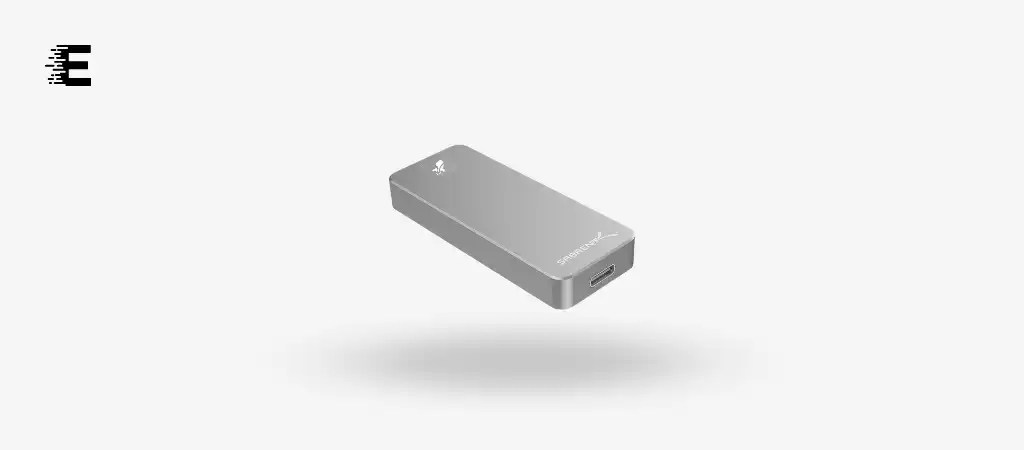
The Sabrent Rocket Nano SSD is a cutting-edge storage solution that has made waves in the tech community. With a sleek design, impressive speed, and portability, it’s a compelling choice for anyone needing high-performance external storage.
In this comprehensive review, we will dive deep into the features, specifications, and performance of the Sabrent Rocket Nano SSD, assess its pros and cons, and provide a detailed conclusion. Additionally, we will answer some frequently asked questions to help you choose the Best External SSD Drive.
Key Features
-
Ultra-Fast Performance
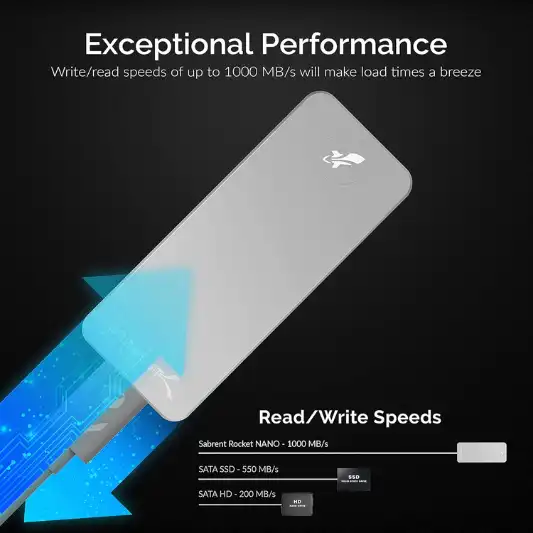
The Sabrent Rocket Nano SSD delivers ultra-fast performance with a 10Gbps throughput, offering speeds of up to 1000MB/s. This makes it ideal for data transfer, backups, and high-speed storage.
-
Compact and Portable Design
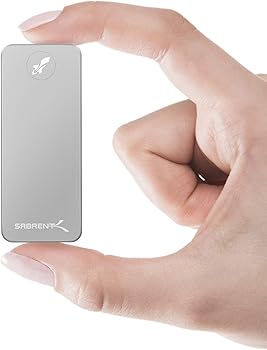
With its ultra-slim aluminum alloy sandblasted shell, the Sabrent Rocket Nano SSD is not only sleek and stylish but also highly durable. Its compact size (2.71 x 1.1 x 0.47 inches) and light weight (6.4 ounces) make it easy to carry anywhere.
-
Universal Compatibility
The SSD is designed to work seamlessly with both Windows and Mac OS, making it versatile and convenient for users across different platforms. It’s OS-independent, fully bus-powered, and requires no additional drivers.
-
Plug & Play Convenience
The Sabrent Rocket Nano SSD is plug-and-play, allowing users to start using it right out of the box without the need for complex setup or installation.
-
Reliable and Durable
Constructed with an aluminum alloy shell, this SSD is built to withstand everyday wear and tear, making it a reliable option for professionals on the go.
Specifications
| Specification | Details |
|---|---|
| Brand | Sabrent |
| Series | SB-1TB-NANO |
| Digital Storage Capacity | 1 TB |
| Hard Disk Interface | USB 3.0 |
| Connectivity Technology | USB |
| Hard Disk Form Factor | 2.75 Inches |
| Hard Disk Description | Solid State Drive |
| Compatible Devices | Laptop, PC |
| Installation Type | External Hard Drive |
| Color | Silver |
| Operating System Compatibility | Windows, Mac OS |
| Item Weight | 6.4 ounces |
| Product Dimensions | 2.71 x 1.1 x 0.47 inches |
| Flash Memory Size | 1 GB |
| Maximum Read/Write Speed | 1000MB/s |
| Item Model Number | SB-1TB-NANO |
| Hardware Platform | Mac |
| ASIN | B07ZWPH7G3 |
| Date First Available | November 1, 2019 |
Pros and Cons
Pros
- Ultra-fast performance with up to 1000MB/s speeds
- Compact and portable design
- Durable aluminum alloy shell
- Broad compatibility with Windows and Mac OS
- Plug-and-play functionality with no drivers required
Cons
- Slightly higher price point compared to other external SSDs
- Limited color options (only available in silver)
- May require additional cables or adapters for older devices
Detailed Review
Performance and Usability
The Sabrent Rocket Nano SSD is engineered for speed and efficiency. With its USB 3.2 Gen 2 interface, the drive achieves remarkable read/write speeds, reaching up to 1000MB/s. This high-speed performance is a boon for users who need to transfer large files quickly or perform data-intensive tasks such as video editing, 3D rendering, or gaming.
One of the standout features of this SSD is its low latency, which ensures smooth and responsive operation. This is particularly important for professionals who require a dependable and fast storage solution. The power efficiency of the Rocket Nano SSD also contributes to its overall performance, ensuring that it operates optimally without draining too much power.
The SSD’s plug-and-play functionality further enhances usability. Whether you’re using a Windows or Mac OS device, you can simply connect the SSD and start using it immediately. The fact that it is fully bus-powered means that you don’t need to worry about carrying an additional power adapter, adding to its portability.
Design and Build Quality
The Sabrent Rocket Nano SSD stands out with its sleek and elegant design. The aluminum alloy shell not only adds to its aesthetic appeal but also provides durability. The sandblasted finish gives it a premium look and feel, making it a stylish accessory for your tech setup.
Despite its small size, the Rocket Nano SSD is incredibly sturdy. The metal casing provides excellent protection against impacts and scratches, ensuring that the drive can withstand the rigors of daily use. The compact form factor means that it can easily fit into your pocket, making it an ideal travel companion.
The design also considers practicality. The silver color is not only visually appealing but also helps to differentiate the SSD from other devices, making it easy to locate in a bag full of gadgets. The design of the Rocket Nano SSD strikes a perfect balance between form and function, offering both aesthetic appeal and practical usability.
Compatibility and Connectivity
One of the key strengths of the Sabrent Rocket Nano SSD is its broad compatibility. It is designed to work seamlessly with both Windows and Mac OS, making it a versatile storage solution for users across different platforms. Whether you’re a Windows user needing extra storage for your PC or a Mac user looking for a fast and reliable external drive, the Rocket Nano SSD has you covered.
The USB 3.2 Gen 2 interface ensures that the SSD can be connected to a wide range of devices, including laptops, desktops, and even some gaming consoles. The backward compatibility with USB 3.0 and USB 2.0 ports ensures that you can use the SSD with older devices, albeit at reduced speeds.
The Rocket Nano SSD also complies with trim and UASP, which helps to maintain the performance and longevity of the drive. The upgradable firmware ensures that the SSD stays up-to-date with the latest features and performance enhancements, giving you peace of mind knowing that your storage solution is future-proof.



Conclusion
The Sabrent Rocket Nano SSD is a top-tier external storage solution that offers a blend of speed, durability, and portability. Its ultra-fast performance makes it an excellent choice for professionals who require a high-speed storage device for tasks such as video editing, 3D rendering, and gaming. The compact and sleek design ensures that it can be easily carried around, making it a perfect companion for those who are always on the go.
The broad compatibility with both Windows and Mac OS adds to its versatility, while the plug-and-play functionality ensures that you can start using the SSD right out of the box without any hassle. The durable aluminum alloy shell provides excellent protection, ensuring that the SSD can withstand the rigors of daily use.
While the Sabrent Rocket Nano SSD is slightly more expensive than some other external SSDs on the market, its performance and build quality justify the price. The limited color options may be a drawback for some users, but the sleek silver design is both stylish and functional.
Overall, the Sabrent Rocket Nano SSD is an outstanding external storage solution that delivers on all fronts. Whether you’re a professional needing high-speed storage for demanding tasks or a casual user looking for a reliable and portable SSD, the Rocket Nano is an excellent choice.
You Might Be Interested In
- WD My Passport SSD Review
- Crucial X8 1TB Portable SSD Review
- Seagate Barracuda Fast SSD Review
- LaCie Rugged SSD Review
- Silicon Power SSD Review
Highly Recommended – ⭐⭐⭐⭐⭐
If you’re in the market for a high-speed, reliable external SSD that combines performance, portability, and durability, the Sabrent Rocket Nano SSD is an excellent investment. Whether you’re a professional who needs to carry large files on the go, a content creator who requires fast data transfers, or simply someone who wants a reliable backup solution, this SSD is designed to meet your needs.
With its sleek design and ultra-fast speeds, the Rocket Nano SSD stands out in a crowded market, offering a premium storage solution that’s both stylish and functional. Don’t settle for slow, outdated external drives—upgrade to the Sabrent Rocket Nano SSD and experience the difference.
Sabrent Rocket Nano SSD vs. Similar Products
When considering an external SSD, it’s essential to compare the Sabrent Rocket Nano SSD with other similar products in the market. Below, we’ll compare the Sabrent Rocket Nano SSD with three popular competitors: the Samsung T7 SSD, SanDisk Extreme Portable SSD, and WD My Passport SSD. This comparison will highlight the key differences in performance, design, compatibility, and price to help you determine which SSD best suits your needs.
Comparison Table
| Feature/Specification | Sabrent Rocket Nano SSD | Samsung T7 SSD | SanDisk Extreme Portable SSD | WD My Passport SSD |
|---|---|---|---|---|
| Storage Capacity | 1 TB | 500GB, 1TB, 2TB | 500GB, 1TB, 2TB | 500GB, 1TB, 2TB |
| Maximum Read/Write Speed | Up to 1000MB/s | Up to 1050MB/s | Up to 1050MB/s | Up to 1050MB/s |
| Interface | USB 3.2 Gen 2 (10Gbps) | USB 3.2 Gen 2 (10Gbps) | USB 3.2 Gen 2 (10Gbps) | USB 3.2 Gen 2 (10Gbps) |
| Durability | Aluminum Alloy Shell, Shock-Resistant | Aluminum Body, Shock-Resistant | Rugged, IP55 Water & Dust Resistant | Metal Body, Shock-Resistant |
| Dimensions (LxWxH) | 2.71 x 1.1 x 0.47 inches | 3.3 x 2.2 x 0.3 inches | 3.9 x 2.0 x 0.4 inches | 3.9 x 2.2 x 0.4 inches |
| Weight | 6.4 ounces | 2.0 ounces | 1.8 ounces | 1.9 ounces |
| Encryption | None | AES 256-bit hardware encryption | AES 256-bit hardware encryption | AES 256-bit hardware encryption |
| Compatibility | Windows, Mac OS | Windows, Mac OS, Android | Windows, Mac OS | Windows, Mac OS |
| Color Options | Silver | Blue, Red, Gray | Black, Red | Gray, Blue, Gold, Silver |
| Warranty | 1-Year Limited Warranty | 3-Year Limited Warranty | 5-Year Limited Warranty | 5-Year Limited Warranty |
| Price Range | $129.99 (1TB model) | $129.99 – $369.99 (Depending on Capacity) | $139.99 – $379.99 (Depending on Capacity) | $124.99 – $329.99 (Depending on Capacity) |
Detailed Comparison
1. Speed and Performance:
- Sabrent Rocket Nano SSD: The Rocket Nano SSD offers speeds of up to 1000MB/s, which is more than sufficient for most use cases, including high-speed data transfer, gaming, and video editing. It provides a seamless experience, particularly for users requiring quick access to large files.
- Samsung T7 SSD: The Samsung T7 SSD slightly edges out the Rocket Nano with read/write speeds of up to 1050MB/s. This minimal speed difference may not be noticeable in everyday use, but for users focused on achieving the absolute fastest transfers, the T7 might have a slight advantage.
- SanDisk Extreme Portable SSD: This SSD also delivers up to 1050MB/s read/write speeds. Additionally, its rugged design caters to users who need both speed and durability, particularly in outdoor or challenging environments.
- WD My Passport SSD: Similar to the T7 and SanDisk models, the WD My Passport SSD offers up to 1050MB/s. This makes it a strong contender in terms of speed, comparable with the other models listed.
2. Design and Durability:
- Sabrent Rocket Nano SSD: With its aluminum alloy shell, the Rocket Nano is both sleek and durable. It’s designed to resist shocks and withstand the rigors of travel, though it lacks official water or dust resistance ratings.
- Samsung T7 SSD: The T7’s aluminum body is sleek and lightweight, but it’s not as rugged as the SanDisk model. It offers a good balance between portability and durability, making it suitable for most users.
- SanDisk Extreme Portable SSD: Known for its rugged design, the SanDisk SSD is IP55 rated, meaning it’s water- and dust-resistant. It’s an ideal choice for users who need a durable drive that can withstand harsher environments.
- WD My Passport SSD: The WD My Passport SSD features a durable metal body that’s shock-resistant and built to last. It’s designed for users who want a reliable and portable drive that can endure daily use.
3. Portability:
- Sabrent Rocket Nano SSD: Compact and lightweight, the Rocket Nano SSD is easy to carry around. Its small size makes it convenient to slip into a pocket or bag, perfect for users who prioritize portability.
- Samsung T7 SSD: The T7 is even smaller and lighter than the Rocket Nano, making it highly portable. Its slim design is a significant advantage for those who need a storage solution that won’t take up much space.
- SanDisk Extreme Portable SSD: Although slightly larger than the T7, the SanDisk Extreme is still very portable. Its rugged design makes it ideal for users who might be traveling or working in more demanding environments.
- WD My Passport SSD: The My Passport SSD is similar in size to the SanDisk model, offering excellent portability with the added benefit of a durable design.
4. Compatibility and Encryption:
- Sabrent Rocket Nano SSD: The Rocket Nano SSD is compatible with both Windows and Mac OS. However, it does not feature built-in hardware encryption, which might be a consideration for users who prioritize data security.
- Samsung T7 SSD: The T7 is not only compatible with Windows and Mac OS but also supports Android devices, making it more versatile. It includes AES 256-bit hardware encryption for secure data storage.
- SanDisk Extreme Portable SSD: This SSD also supports Windows and Mac OS, with AES 256-bit hardware encryption included. It’s a good choice for users who need secure and rugged storage.
- WD My Passport SSD: The My Passport SSD is similar to the SanDisk model, offering compatibility with Windows and Mac OS, along with AES 256-bit hardware encryption.
5. Price and Value:
- Sabrent Rocket Nano SSD: The Rocket Nano SSD is priced competitively, especially considering its performance and design. It offers good value for users looking for a balance of speed, portability, and durability.
- Samsung T7 SSD: The T7 is slightly more expensive, but it offers marginally faster speeds and broader compatibility with additional devices. Its value proposition is strong for users who want the best all-around performance.
- SanDisk Extreme Portable SSD: The SanDisk model is priced higher due to its rugged design and additional durability features. It’s ideal for users who need a drive that can endure harsher conditions.
- WD My Passport SSD: The WD My Passport SSD offers excellent value with its combination of speed, durability, and built-in encryption. Its competitive pricing makes it a strong choice for users seeking a reliable and secure SSD.
FAQs
Is the Sabrent Rocket Nano SSD compatible with gaming consoles?
Yes, the Sabrent Rocket Nano SSD is compatible with several gaming consoles, particularly those that support external storage via USB. This includes popular consoles like the PlayStation 4, PlayStation 5, Xbox One, and Xbox Series X/S.
For the PlayStation 4 and PlayStation 5, the Sabrent Rocket Nano SSD can be used to store and play games, although on the PlayStation 5, games optimized for the next-gen console will need to be moved to internal storage to be played. Similarly, on the Xbox Series X/S, the SSD can be used to store games that can be transferred to internal storage when you’re ready to play. However, older Xbox One games can be played directly from the external drive.
To use the Sabrent Rocket Nano SSD with these consoles, you simply need to connect it via a USB port. The SSD is plug-and-play, so the console should recognize it immediately, allowing you to format the drive for game storage. Keep in mind that while the SSD is incredibly fast, actual game load times may vary depending on the console’s architecture and how it interacts with external storage.
Can I use the Sabrent Rocket Nano SSD with older USB ports?
Yes, the Sabrent Rocket Nano SSD is backward compatible with older USB standards, including USB 3.0 and USB 2.0. This means you can use it with devices that have these older USB ports, such as older laptops, desktops, or other electronics. However, there are some important considerations to keep in mind.
While the SSD will function with older USB ports, the data transfer speeds will be limited by the maximum throughput of the port itself. For instance, USB 2.0 has a maximum theoretical speed of 480Mbps, which is significantly slower than the 10Gbps offered by USB 3.2 Gen 2. USB 3.0, on the other hand, has a maximum speed of 5Gbps, which is faster but still not as fast as the SSD’s potential. As a result, you won’t experience the full 1000MB/s transfer speeds that the Sabrent Rocket Nano SSD is capable of delivering when connected to a USB 3.2 Gen 2 port.
For users with older devices, it’s still worth using the Rocket Nano SSD for its durability, portability, and reliability. If you upgrade to a newer device with USB 3.2 Gen 2 ports in the future, you’ll be able to take full advantage of the SSD’s high-speed capabilities.
How do I update the firmware of the Sabrent Rocket Nano SSD?
Updating the firmware of the Sabrent Rocket Nano SSD is a straightforward process that can help ensure your drive operates at its best. Firmware updates are occasionally released by Sabrent to improve performance, enhance compatibility, or add new features to the SSD.
To update the firmware, follow these steps:
- Visit the Sabrent Website: Go to the official Sabrent website and navigate to the support section. There, you will find a page dedicated to firmware updates for their products. Ensure you select the correct model number (SB-1TB-NANO) for the Rocket Nano SSD.
- Download the Firmware: Once you’ve located the correct firmware update for your model, download the file to your computer. Be sure to carefully read any instructions provided on the download page, as they may include important details about the update process.
- Install the Firmware: After downloading the firmware, follow the provided instructions to install it. This may involve running a software application provided by Sabrent, which will guide you through the update process. Typically, this involves connecting the SSD to your computer, launching the update utility, and allowing it to complete the installation.
- Restart Your Computer: After the firmware update is complete, it’s a good idea to restart your computer to ensure that all changes are properly applied.
Updating the firmware is generally a safe process, but it’s important to follow all instructions carefully. If you encounter any issues during the update, Sabrent’s customer support can provide assistance.
Is the Sabrent Rocket Nano SSD suitable for use with a MacBook Air?
Absolutely, the Sabrent Rocket Nano SSD is an excellent choice for MacBook Air users, particularly those who require additional storage or faster data transfer speeds. MacBook Air, known for its portability and efficiency, pairs perfectly with the compact and high-performing Rocket Nano SSD.
The SSD’s compatibility with macOS means that it’s fully plug-and-play with the MacBook Air. Whether you’re using the SSD for expanding storage, backing up your data with Time Machine, or working with large files like videos or high-resolution images, the Rocket Nano will provide the speed and reliability you need.
Given that MacBook Air models, particularly those with SSD storage, can sometimes be limited in built-in storage capacity (e.g., 256GB or 512GB), the Rocket Nano SSD offers a substantial 1TB of additional storage space. This is particularly useful for creatives, such as photographers, video editors, or music producers, who need fast, reliable external storage that can keep up with their demanding workflows.
Moreover, the ultra-slim and lightweight design of the Rocket Nano complements the MacBook Air’s aesthetics, making it easy to carry both devices in a small bag or even a large pocket. The silver aluminum casing also matches well with the MacBook’s design, making it not just a functional tool but a stylish accessory.
What is the warranty period for the Sabrent Rocket Nano SSD?
The Sabrent Rocket Nano SSD comes with a standard one-year limited warranty from the date of purchase. This warranty covers any defects in materials or workmanship, giving you peace of mind that the product is free from manufacturer defects.
To make the most of your warranty, it’s recommended that you register your product on the Sabrent website soon after purchase. This not only helps in verifying your warranty status but also may qualify you for extended warranty options or additional support resources.
If you encounter any issues with your Rocket Nano SSD within the warranty period, you can contact Sabrent’s customer support for assistance. They may offer troubleshooting tips, repair services, or a replacement if the issue is covered by the warranty.
It’s important to note that the warranty does not typically cover damage caused by misuse, accidents, or unauthorized modifications. Therefore, it’s crucial to handle the SSD with care and follow all usage guidelines provided by Sabrent.
This robust warranty, coupled with Sabrent’s reputation for quality, ensures that you are making a secure investment in your storage needs.
