


If you ask ten developers what “application deployment” means, you’ll probably get ten slightly different answers. Some will say it’s “pushing code to production.” Others will mention CI/CD pipelines or Docker. All of that is technically true, but it misses the real picture. What Is The Application Deployment Process?
In real systems, deployment is the moment your code stops being just code and starts affecting actual users. It is the point where mistakes become visible, where performance issues turn into alerts, and where small oversights can turn into production incidents at 2 AM.
I’ve seen teams treat deployment like a final button press. In practice, it is a full process that starts long before the release and continues long after the code is live. If you understand deployment only as “uploading a build,” you will eventually run into systems that break in ways you did not expect.
This article is about how deployment actually works in real engineering teams, not the idealized version you see in documentation.
What Application Deployment Actually Means
On paper, deployment is described as moving code from development into production. That definition is too clean.
In practice, deployment means taking a system that worked in one controlled environment and trying to make it behave the same way in another environment that is rarely identical.
Moving code into real environments
Code does not exist in isolation. It depends on databases, environment variables, external APIs, operating system behavior, and network conditions. When you deploy, you are not just moving code. You are reassembling a working system in a new place.
This is where things start to diverge from expectations. A feature that works perfectly on a developer machine can fail in production because of a missing configuration or a slightly different runtime version.
What “production” actually means
Production is not just another environment. It is the version of your system that real users depend on. It usually has:
- Real traffic
- Real data
- Real performance constraints
- Real monitoring and alerting systems
The important thing is that production is unforgiving. In development, you can restart services or reset databases. In production, every mistake has consequences.
Why deployment is more than just “releasing code”
Deployment is not a single action. It is a chain of events that includes building, testing, packaging, transferring, configuring, and verifying.
If any link in that chain fails, the deployment is either broken or incomplete. And in real systems, partial failures are more common than clean successes.
The Real Application Deployment Process
Let’s walk through how deployment actually happens in most modern engineering teams.
Code ready stage
Everything starts when code is “ready.” In theory, this means features are complete and tested. In reality, it means someone believes it is ready enough to move forward.
This is where the first gap appears. Code that passes local testing might still depend on assumptions that are not valid elsewhere.
Common issues here include:
- Hardcoded values that only work locally
- Missing environment variables
- Uncommitted configuration changes
Build process
Once code is ready, it goes through a build process. This is where source code is transformed into something runnable, like a binary, a container image, or a packaged artifact.
In real systems, this step often exposes hidden problems:
- Dependency conflicts
- Failed package installations
- Version mismatches between build and runtime environments
I’ve seen builds pass in development but fail in CI because the CI environment is stricter or cleaner than a developer machine.
Testing stages
Testing in deployment pipelines is not just unit tests. It often includes integration tests, end-to-end tests, and sometimes performance checks.
But here’s the truth: testing never catches everything.
What usually happens:
- Unit tests pass
- Integration tests pass
- A small edge case still breaks in production
The gap exists because testing environments are simplified versions of reality. They rarely simulate full production load or real user behavior.
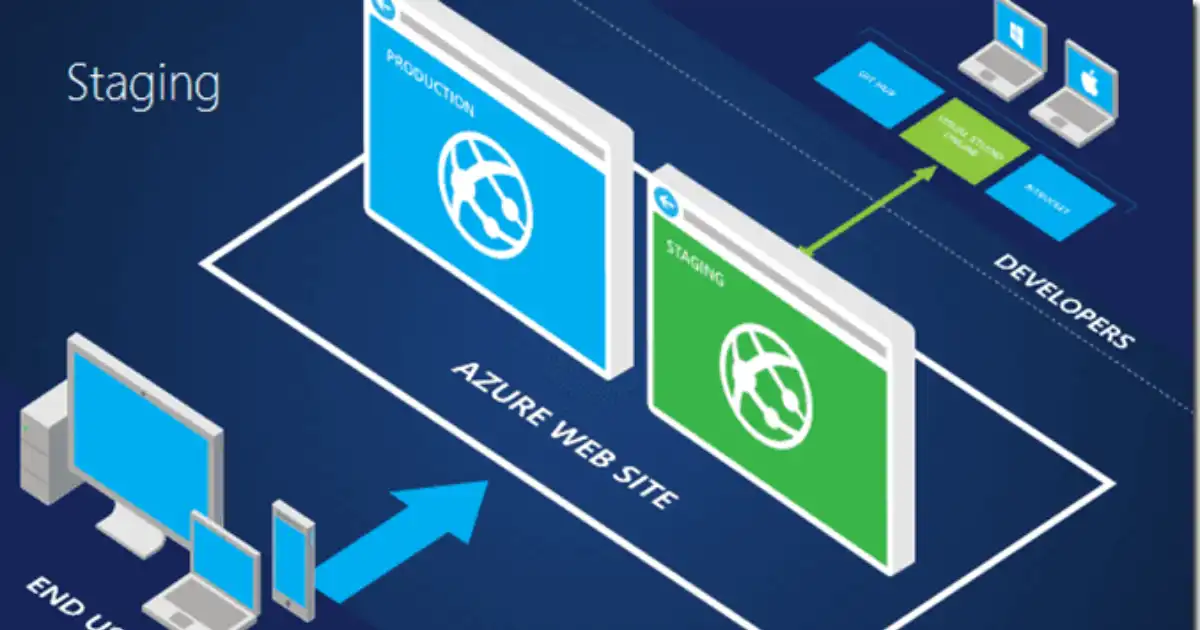
Staging environment
Staging is supposed to mirror production. In theory, it is the final checkpoint.
In practice, staging is often slightly different:
- Smaller datasets
- Lower traffic simulation
- Slightly different infrastructure
This is where teams get overconfident. If staging looks fine, people assume production will also be fine. That assumption is where many incidents start.
Approval process
In many organizations, deployments require approval. This can be manual or automated.
Approval is not just bureaucracy. It is a risk control mechanism. Someone is supposed to confirm that the release is safe.
But in fast-moving teams, approvals often become routine clicks, which reduces their effectiveness.
Production deployment
This is the critical step. The actual deployment might involve:
- Pulling a new container image
- Updating a service version
- Running database migrations
- Restarting services
This is where small mistakes become big problems.
A classic real-world failure is deploying application code before database migrations are fully compatible. The result is runtime errors that are hard to rollback cleanly.
Monitoring after release
Deployment does not end when code is live. In many ways, that is when the real work begins.
Teams watch:
- Error rates
- Latency spikes
- CPU and memory usage
- User behavior signals
In good teams, the first 30 minutes after deployment are treated as a critical observation window. If something looks wrong, rollback decisions happen fast.
Deployment Environments Explained
Development
This is where developers write and test code locally. It is flexible and fast, but not realistic.
Testing or QA
This environment is used to validate functionality. It is more structured than development but still not identical to production.
Staging
Staging tries to replicate production as closely as possible. It is the last checkpoint before real users are affected.
Production
Production is the live system. It is optimized for stability, not experimentation.
How code moves between them in real companies
In mature teams, code moves through environments automatically using CI/CD pipelines. In less mature setups, it moves manually through scripts, file transfers, or even direct server access.
The more manual the process, the higher the risk of human error.
Deployment Strategies Used in Real Systems
Manual deployment
Manual deployment still exists more than people admit. A developer logs into a server and runs commands.
It works in small systems but breaks down quickly as complexity grows. The biggest risk is inconsistency between deployments.
CI/CD pipelines
CI/CD automates the entire process from code commit to production deployment.
In theory, it removes human error. In practice, it shifts the risk into pipeline configuration. A broken pipeline can block all deployments.
Blue-green deployment
This strategy runs two identical environments. One is live (blue), the other is idle (green). You switch traffic between them during deployment.
It reduces downtime but increases infrastructure cost.
The risk appears when data synchronization is not handled properly.
Rolling deployment
Here, updates are applied gradually to servers instead of all at once.
It reduces risk but makes debugging harder because different versions run simultaneously.
Canary deployment
A small percentage of users get the new version first.
This is one of the safest strategies, but it requires strong monitoring. If you miss early warning signals, issues can spread before rollback.
Tools Used in Application Deployment
Git-based workflows
Git is the foundation of most deployment systems. Branching strategies like GitFlow or trunk-based development determine how code reaches production.
CI/CD tools
Tools like Jenkins, GitHub Actions, and GitLab CI handle automation.
In real systems, these tools are not just “build runners.” They become the backbone of deployment logic, managing everything from tests to deployment triggers.
Docker and Kubernetes
Docker packages applications into containers, making environments more consistent.
Kubernetes manages those containers at scale. In real production systems, Kubernetes handles:
- Scaling services
- Restarting failed containers
- Load balancing traffic
But it also introduces complexity. Misconfigured clusters can make debugging deployment issues extremely difficult.
Cloud platforms
AWS, Azure, and GCP provide infrastructure for deployment.
In practice, most teams rely on a mix of:
- Virtual machines
- Managed databases
- Load balancers
- Storage services
Cloud platforms make deployment easier, but they also hide complexity that teams only discover during outages.
Common Real-World Problems in Deployment
Environment mismatch bugs
Code works in staging but fails in production because environments are not truly identical. This is one of the most common and frustrating issues.
Broken pipelines
A small change in a CI configuration can break the entire deployment system. Suddenly, no one can release anything.
Configuration errors
Missing environment variables or incorrect secrets often cause silent failures that are hard to detect immediately.
Silent production failures
Not all failures crash systems. Some degrade performance or break specific features without obvious errors.
These are the most dangerous because they go unnoticed.
Rollback failures
Rolling back is not always simple. Database changes, schema migrations, or stateful services can make rollback incomplete or risky.
Human mistakes
Accidentally deploying the wrong branch or skipping steps still happens, especially under pressure.
Best Practices That Actually Work
Automation vs manual trade-offs
Automation reduces human error, but it increases system complexity. The goal is not full automation, but reliable automation.
Why staging environments still matter
Even imperfect staging environments catch issues that tests miss. Skipping staging to save time usually increases risk.
Importance of rollback planning
A deployment without a rollback plan is not a safe deployment. In real systems, rollback is often more important than the deployment itself.
Monitoring and alerting after deployment
Good teams treat monitoring as part of deployment, not an afterthought. Without monitoring, you are flying blind.
Version control discipline
Clean branching strategies and meaningful commit history make debugging deployment issues significantly easier.
Deployment vs Release vs Delivery (Simple Breakdown)
Deployment is putting code into an environment.
Release is making a feature available to users.
Delivery is the entire process from idea to production.
In real teams, these are often mixed, but understanding the difference helps clarify responsibility. A feature can be deployed but not released, especially in feature-flag systems.
You Might Be Interested In
- How Ai For Public Transportation Optimization Works?
- Best 5 Ai Apps Helping Kids Learn Coding For Free
- How To Code Rock Paper Scissors In Python?
- Best 5 Edge Computing Solutions For 6g Smart Factories
- How To Create FAQ Schema With Ai?
Conclusion
Application deployment is not just a technical step. It is an operational process that connects development work to real-world impact.
In real engineering teams, deployment is where planning, automation, infrastructure, and human judgment all intersect. It is also where weaknesses in systems become visible.
The important thing to understand is that deployment is never just about moving code. It is about managing risk while delivering change safely to users. And the more real systems you work with, the more you realize that deployment is as much about discipline and communication as it is about tools.
