


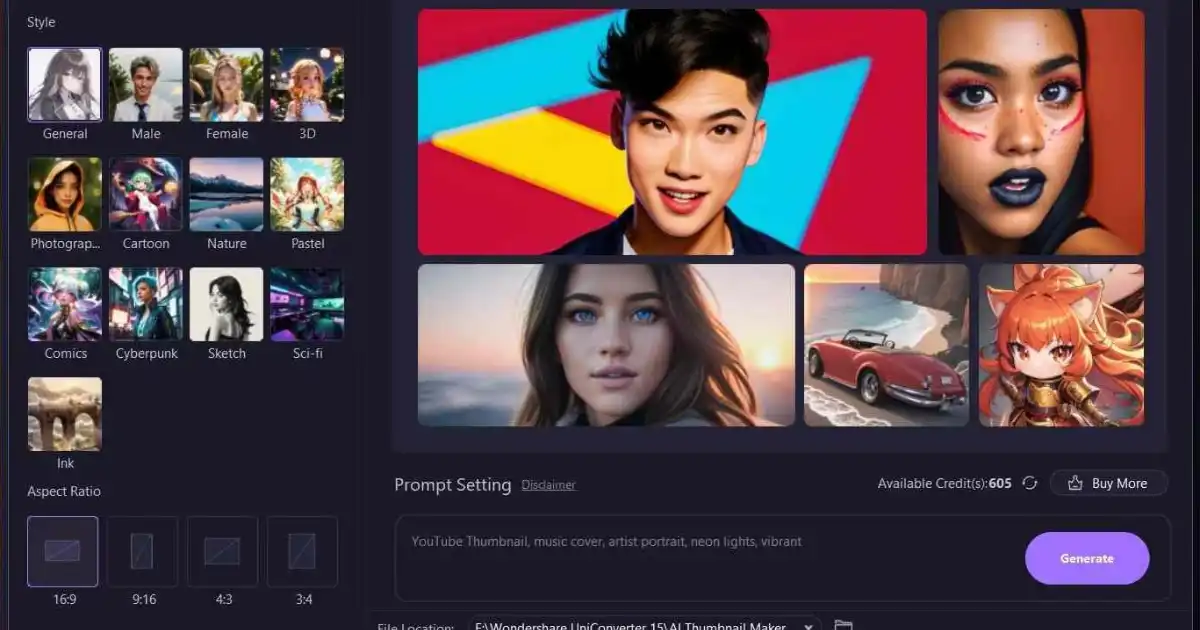
Imagine you upload a video, a blog post, or a social media link—and then watch viewers scroll past your content as if it doesn’t even exist. You know the content is good. But the thumbnail you chose? It didn’t do you any favors. In a sea of dazzling visuals, how do you stand out fast? What if an AI tool could design your thumbnail for you—one optimized to grab eyeballs, spark curiosity, and boost your click-through rate (CTR)? Welcome to the future.
That’s exactly what the new generation of AI thumbnail tools promises. These platforms analyze colors, facial expressions, layout, and more to automatically generate thumbnails that compel people to click. You don’t need to be a Photoshop expert, or spend hours iterating. Just plug in your media, and let machine learning do the heavy lifting. The question is: which tools actually deliver CTR lifts—and how do you choose among them?
In this guide, you’ll discover 11 AI thumbnail tools that creators, marketers, and publishers are using right now to get noticeable CTR lifts. You’ll learn their strengths, weaknesses, pricing models, and how to use them strategically—not just for looks, but for performance. By the end, you’ll know which tool fits your style, workflow, and budget. Imagine uploading your next video or blog post with confidence—knowing your thumbnail is already optimized to convert.
Scroll down, compare these 11 AI tools, test a few, and start measuring CTR improvements on your content. Bookmark this guide, come back to it when you launch your next campaign, and let your thumbnails work for you.
Why Thumbnails Matter for CTR
What Is CTR & Why It Matters
Click-through rate (CTR) = (Clicks ÷ Impressions) × 100%. A higher CTR means more people see your thumbnail, click, and engage. For videos, articles, social posts—thumbnails can mean the difference between viral reach and being lost in the noise. A mere 0.5% improvement in CTR, over thousands of views, can translate into hundreds or thousands more engagements, which cascade into better rankings, social proof, ad revenue, or monetization opportunities.
The Psychology Behind Thumbnails
-
Visual salience
Bright colors, contrast, and faces attract attention.
-
Emotion & curiosity
A facial expression or hint of mystery triggers click reflexes.
-
Readability
Clear, bold text helps people understand the content.
-
Relevance
The image must match the content; misleading visuals drive bounce.
AI thumbnail tools aim to blend all these principles automatically, using data from successful thumbnails to generate better designs.
Traditional vs AI-Powered Thumbnail Creation
In the past, creators relied on manual tools: Photoshop, Canva, GIMP, etc. That required design skills, time, and repeated A/B tests. With AI thumbnail tools, much of the design thinking is automated. But not all tools are equal—some focus more on style, others on data, some on speed. Hence, this guide.
11 AI Thumbnail Tools for CTR Lifts
Below are 11 promising AI thumbnail tools, with a breakdown of pros, cons, pricing, and tips for use.
| Tool | Key Features | Best Use Case | Price or Freemium | Drawbacks |
|---|
1. TubeBuddy AI Thumbnail Generator
Key Features:
Integrated with YouTube workflow, uses AI to suggest thumbnails, includes split-testing.
Best Use Case:
YouTube creators who want quick thumbnails tuned to YouTube analytics.
Price:
Freemium; advanced options in paid plans.
Drawbacks:
Limited to YouTube; fewer creative controls than standalone design tools.
Tips:
Use its A/B test function to compare two thumbnails over time. Monitor CTR changes weekly. Combine its suggestions with your branding colors.
2. Canva Magic Resize / Smart Mockups + AI Enhancements
Key Features:
Canva now includes AI features such as background removal, suggested layouts, and resizing.
Best Use Case:
People already comfortable with Canva, wanting the AI boost.
Price:
Canva free + Pro upgrades.
Drawbacks:
Not thumbnail-first; some AI features are not fully automated thumbnails.
Tips:
Start with Canva’s template, then let its AI suggest layout improvements. Export consistent aspect ratios for YouTube, blog posts, social media.
3. Snappa AI Thumbnail Maker
Key Features:
Smart layout suggestions, background removal, auto image suggestions.
Best Use Case:
Blog writers, social media content creators.
Price:
Free tier with limited downloads; paid plans unlock full features.
Drawbacks:
Templates may feel generic; fewer advanced AI analytics.
Tips:
Use Snappa’s suggested color combinations. Test variations manually if you want a human touch.
4. RelayThat
Key Features:
Brand consistency, automated layout adaptation, presets, AI suggestions across formats.
Best Use Case:
Brands that need consistent visuals (blog, Pinterest, YouTube, social).
Price:
Paid plans; limited free trial.
Drawbacks:
Learning curve; less custom tweak flexibility.
Tips:
Upload your brand assets (logo, font, colors) first. Use its batch generation to create many thumbnail variants at once.
5. Lumen5 Thumbnail Generator
Key Features:
Uses video frames and AI to suggest thumbnails, image templates around that.
Best Use Case:
Video creators already using Lumen5 for video generation.
Price:
Part of Lumen5 subscription.
Drawbacks:
Limited standalone utility if you don’t use Lumen5 videos.
Tips:
Let Lumen5 suggest frames early in the video creation process. Export thumbnails that match your visual brand.
6. Designs.ai (Graphicmaker + Videomaker)
Key Features:
AI + template-based generation, suggestions, multi-format exports.
Best Use Case:
Users who want an “all-in-one” creative suite with thumbnail capabilities.
Price:
Subscription model.
Drawbacks:
Not entirely specialized for thumbnails; quality varies across templates.
Tips:
Use its analytics on image suggestions. Start with multiple versions and pick the one with best visual balance.
7. Thumbify.ai
Key Features:
Specialized thumbnail AI tool with suggestions optimized for CTR, title & face emphasis, emotional triggers.
Best Use Case:
YouTubers or course creators who want high-performing thumbnails quickly.
Price:
Freemium or subscription-based (varies).
Drawbacks:
Newer tool; smaller user base, integration may be less mature.
Tips:
Always override default text if it doesn’t match your title. Use its face detection threshold settings to emphasize emotion.
8. Picmaker (YouTube Thumbnail Maker + AI Suggestions)
Key Features:
Thumbnail-specific templates, auto-suggestions, balloon text ideas, color palettes.
Best Use Case:
Independent creators who want thumbnails fast without heavy design skills.
Price:
Free with limits; premium for full access.
Drawbacks:
Templates may feel repetitive; limited originality unless you tweak.
Tips:
Customize text weight and placement. Use the color suggestions to stay on brand.
9. Kapwing Smart Thumbnail / Autothumb Features
Key Features:
AI that picks a frame in your video, plus ability to overlay text, effects.
Best Use Case:
Video creators who want to generate thumbnails automatically as part of video editing.
Price:
Free with watermark, paid to remove watermark and unlock features.
Drawbacks:
Smart thumbnail might pick unflattering frames; manual tweaks often needed.
Tips:
Use Kapwing’s “thumb indicator” to mark preferred frames. Combine with color filters to increase contrast.
10. Designhill Thumbnail Maker + AI Graphics Tools
Key Features:
AI design suggestions, brand asset integration, scalable exports.
Best Use Case:
Designers or marketers who want more control but also AI inspiration.
Price:
Pay-per-use or subscription.
Drawbacks:
It’s more general graphic design; thumbnail heuristics may be less refined.
Tips:
Use AI suggestions as a starting point, then refine layout, contrast, and facial placement.
11. Crello / VistaCreate (with AI tools)
Key Features:
Templates, auto-resize, background removal, design suggestions.
Best Use Case:
Social media managers who occasionally need thumbnails along with other creative content.
Price:
Free tier + paid upgrade.
Drawbacks:
Not thumbnail-centric; fewer performance analytics.
Tips:
Use their preset dimensions for YouTube and blog posts. Let AI adjust layout, then fine-tune text and imagery.
How to Evaluate AI Thumbnail Tools (so you don’t pick the wrong one)
When choosing among the 11, keep these evaluation criteria in mind:
1. CTR-Oriented Intelligence
Look for tools that don’t just design pretty images—they analyze performance data (heatmaps, click metrics) or come from YouTube/Social API integration.
2. Customization Flexibility
AI suggestions are a starting point. You still want to adjust text, colors, cropping, and positioning as needed.
3. Brand Integration
Your thumbnails must align with brand colors, logos, fonts. A good tool lets you upload and save brand assets.
4. Formats & Export Options
Your content spans YouTube, blog, Instagram, Facebook. Pick tools that let you export to multiple sizes (16:9, 1:1, story formats).
5. Ease of Use & Learning Curve
Some tools are plug-and-play; others require design knowledge. If you’re in a hurry, favor simplicity without sacrificing performance.
6. Cost & Scalability
Many tools start free—but quotas, watermarks, or limits may push you to pay. Check if pricing scales affordably as you grow.
7. Analytics & A/B Testing
The best thumbnail tool lets you run tests between designs, compare CTRs, and iterate. Without performance tracking, you’re flying blind.
Strategic Tips to Get CTR Lifts Using These Tools
Use A/B Testing Religiously
Even AI-suggested thumbnails aren’t perfect. Upload two variants, monitor CTR for 48–72 hours, then pick the winner. Over time, your data helps refine what works for your audience.
Mind the Rule of Thirds & Eye Flow
Ensure your subject (face, object) aligns with compositional rules. Most AI tools allow you to adjust focal points manually.
Bold, Readable Text Overlays
If you include text (title, tagline), keep it short (3–5 words). Use bold fonts. Let AI recommendations guide sizing, but confirm readability on small mobile screens.
Emotional & Engaging Faces
Thumbnails with human faces expressing emotion (surprise, determination, joy) tend to outperform neutral faces. Many AI tools automatically detect faces—tweak as needed.
Contrast & Color Pops
Choose contrasting colors (light vs dark) to make the subject pop. AI tools often include palette suggestions—use them but adjust for your brand.
Keep It Honest
Don’t mislead users. If your thumbnail promises something wildly different, you’ll increase bounce, reduce session time, and hurt your credibility.
Maintain Consistency
Over time, consistent fonts, color schemes, and layout build brand recognition. Use tools that store brand assets so you don’t reinvent from scratch.
Iterate Based on Data
One early thumbnail might work well, but trends change. Revisit high-traffic posts after weeks or months—update the thumbnail (using your AI tool), and measure CTR differences again.
Example Workflow: How You Might Use These Tools in Practice
-
Script / plan your content (video or article).
-
Choose one of the AI thumbnail tools (e.g. Thumbify.ai or TubeBuddy) and let it generate 3–5 options.
-
Import brand assets (logo, fonts, color codes).
-
Pick the top two variants and tweak: adjust crop, enlarge face, test text size.
-
Export in multiple sizes (16:9 for YouTube, 1:1 for social).
-
Upload both to your platform as an A/B test.
-
After a few days, monitor CTR analytics. Replace the lower-performing thumbnail with the winner.
-
Take notes: What colors? What facial expressions? What text style? Use that intelligence in future thumbnails.
Comparison Table & Final Thoughts
Below is a summary comparison to help you match your needs:
| Your Need | Recommended Tool(s) | Why |
|---|---|---|
| You want seamless YouTube integration & A/B testing | TubeBuddy AI Thumbnail Generator | Works within YouTube workflow |
| You already use Canva | Canva + its AI layout suggestions | Familiar interface + AI boosts |
| You want brand consistency across all formats | RelayThat | Automates layout across formats |
| You want increased CTR from videos | Kapwing (Smart Thumbnail) or Lumen5 | Picks strong frames + allows overlay |
| You need a thumbnail-specific tool | Thumbify.ai, Picmaker | Focused on thumbnails |
| You want full creative suite including thumbnails | Designs.ai, Designhill | All-in-one design tools |
| You juggle social media + blog + video | VistaCreate / Crello | Good for multi-format use |
You Might Be Interested In
- Prompt Engineering for Developers: Get Better Code from AI
- Why Does Ai Chip Cooling Matter In Data Centres?
- 7 Ai Translation Extensions To Try
- How Many Courses Are In Ai?
- What Is A Cloud Hosting Platform And How Does It Work
- What Are Best Cloud Providers For Ai Startups?
- Best 5 Open-source Alternatives To Cuda Platform
- Is All Computer Vision Ai?
- What Are Hype In Ai Reporting Examples?
- How To Make Autonomous Ai Chat Bots?
Conclusion
Thumbnails are your first line of defense (or offense) when competing for attention. In a digital world flooded with content, your visuals need to speak louder than your words. That’s why AI thumbnail tools are such a breakthrough: they combine design principles, data intelligence, and automation to help you generate thumbnails that not only look good—but perform.
Over the course of this guide, you’ve explored 11 AI thumbnail tools that creators and marketers use to generate measurable CTR lifts. You’ve learned their strengths, trade-offs, and how to evaluate them based on design flexibility, brand integration, analytics, and pricing. More importantly, you now have a strategic framework: select one or two tools, run A/B tests, iterate thumbnails based on data, and constantly refine your creative formula.
By combining human judgment with AI capability, you empower yourself to outpace competitors who rely on static or generic thumbnails. Watch your click rates climb, engagement grow, and your brand presence sharpen.
Go ahead—test one of these AI thumbnail tools on your next post or video. Measure the before vs after CTR. And come back to this guide whenever you’re ready to upgrade your visual game.
FAQs about Ai Thumbnail
What is the AI tool for making thumbnails?
An AI tool for making thumbnails is a digital program powered by artificial intelligence that helps you design eye-catching YouTube or social media thumbnails quickly and easily. These tools analyze video content, text, and visual styles to generate custom thumbnail designs that attract viewers’ attention. Popular examples include Canva’s AI Thumbnail Maker, Fotor AI, and Thumbnail AI. They use machine learning to suggest the best colors, fonts, and image compositions based on what’s likely to perform well. You can upload an image, type a few keywords, and the AI will automatically create a professional-looking thumbnail that matches your content style.
Unlike traditional editing software, these AI tools require little to no design experience. They make it easy for creators, marketers, and influencers to produce thumbnails that increase click-through rates (CTR). By using templates, smart background removers, and auto-enhancement features, AI tools save time and help your content stand out in a crowded feed.
Can you use AI for thumbnails?
Yes, you can definitely use AI for thumbnails—and it’s becoming one of the most popular ways to design them. AI can analyze your video’s title, description, and theme to generate thumbnails that look professional and visually appealing. It can even detect facial expressions, adjust lighting, and suggest layout improvements to make sure your thumbnail grabs attention. Instead of spending hours editing images manually, you can use AI tools to create thumbnails in minutes that still look custom-made.
Using AI for thumbnails also helps boost engagement because these tools often rely on data from thousands of high-performing videos. They understand what kind of colors, fonts, and designs attract clicks. Whether you’re a YouTuber, teacher, or small business owner, AI tools make it easy to test different thumbnail versions and choose the one that performs best—all without advanced design skills.
Can ChatGPT make thumbnails?
ChatGPT itself cannot directly create or design thumbnails, but it can help you plan and design them effectively. For example, ChatGPT can generate ideas for catchy text overlays, color combinations, and image styles that would fit your video’s topic. It can also write compelling thumbnail headlines or call-to-action phrases that make people want to click. Then, you can use those ideas in an AI image tool like Canva, Fotor, or Leonardo AI to bring the design to life visually.
In other words, ChatGPT acts as your creative assistant for brainstorming and scriptwriting, while other AI image generators handle the visual part. When used together, they make a powerful combo for producing high-quality, attention-grabbing thumbnails that can boost your video’s success.
Does MrBeast use AI for thumbnails?
Yes, MrBeast and his team are known to use AI tools and data-driven techniques to create thumbnails that perform exceptionally well. They often test multiple thumbnail designs using AI-based analytics to see which one attracts the most clicks before publishing a video. This process helps them understand what visual elements—like facial expressions, emotions, or colors—get the best reaction from viewers.
MrBeast’s creative team also combines AI tools with human creativity. They use AI for testing and optimization, while designers refine the final look. This smart balance between data and design is one reason his videos get millions of views. The use of AI helps him ensure that each thumbnail captures the perfect mix of curiosity, excitement, and storytelling—all in a single image.
Who is MrBeast’s wife?
As of now, MrBeast, whose real name is Jimmy Donaldson, is not married. However, he has been publicly known to be in a relationship with Thea Booysen, a South African content creator and author. The couple reportedly met while MrBeast was visiting South Africa and started dating soon after. Thea often appears in some of MrBeast’s social media posts and has her own YouTube and Twitch channels where she shares gaming and lifestyle content.
While fans are curious about their relationship, both MrBeast and Thea prefer to keep their personal lives relatively private. They occasionally share lighthearted moments online, but most of MrBeast’s focus remains on his massive YouTube projects, charity work, and business ventures.
